49 + 1 utilidades didácticas de Google Drive.
See it on Scoop.it, via Educacion, ecologia y TIC
Continuar leyendo: 49 + 1 utilidades didácticas de Google Drive.
Fuente: Educación y Ecología
See it on Scoop.it, via Educacion, ecologia y TIC
Continuar leyendo: 49 + 1 utilidades didácticas de Google Drive.
Fuente: Educación y Ecología
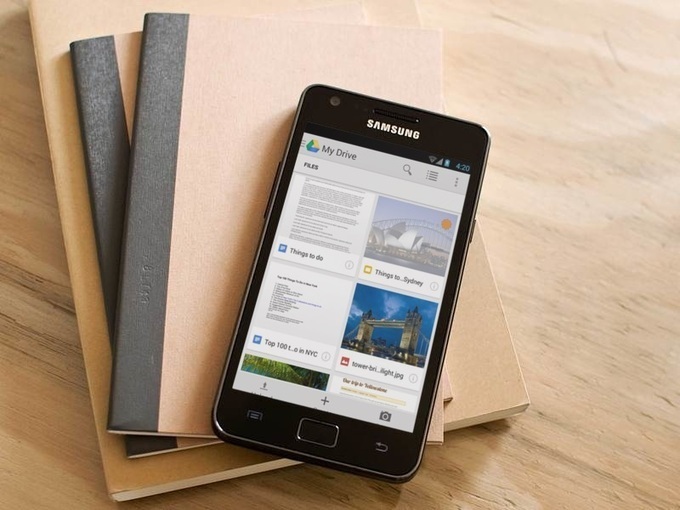
Gracias a una nueva actualización, ahora podemos descargar archivos adjuntos a Google Drive fácilmente, directo desde un correo electrónico.See it on Scoop.it, via TIC & Educación
Continuar leyendo: Cómo descargar archivos adjuntos a Google Drive en Gmail
Fuente: Tic&Educación

Gmail se actualiza con una función que permite descargar los archivos adjuntos a Google Drive, el sistema de almacenamiento en la nube de Google.See it on Scoop.it, via TIC & Educación
Continuar leyendo: Gmail permite guardar los archivos adjuntos en Google Drive
Fuente: Tic&Educación
Por esta razón os presentamos a MultCloud, una herramienta online que te permitirá gestionar todas las “nubes” que utilices desde una sola. No necesitas descargar nada. Basta con registrarte y añadir todas esas cuentas que tenías que gestionar una a una, para ahora poder hacerlo desde una sola ventana. Desde Dropbox hasta Google Drive pasando por Box, o incluso el almacenamiento de Amazon.See it on Scoop.it, via TIC & Educación
Continuar leyendo: Accede a todo tu almacenamiento en la nube con MultCloud
Fuente: Tic&Educación
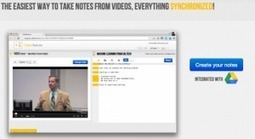
VideoNotes es una nueva herramienta totalmente gratuita que nos permite a los docentes tomar notas mientras vemos vídeos. VideoNotes permite cargar cualquier vídeo de YouTube o Vimeo en el lado izquierdo de la pantalla y en el lado derecho de la pantalla nos agrega un bloc de notas para escribir. Actualmente, esta aplicación puede ser se integrada con nuestra cuenta de Google Drive. Al integrarse VideoNotes con Google Drive nos permite compartir notas.See it on Scoop…
Continuar leyendo: VideoNotes, excelente herramienta para tomar notas mientras observas vídeos
Fuente: Tic&Educación
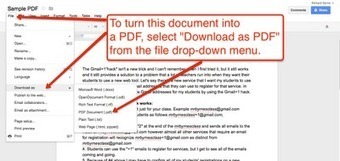
From time to time I find that I need to create a PDF to use as a flyer or to send information that can’t easily be edited. Most of the time I create my PDFs in Google Drive. It’s a simple process and the directions for doing it are provided in the screenshots below.See it on Scoop.it, via TIC & Educación
Continuar leyendo: How to Quickly Create PDFs in Google Drive
Fuente: Tic&Educación
Ya hemos visto como crear código QR personalizados, y la mayoría de ellos requieren que visite un sitio web o descargar un programa. Para los usuarios de Google Docs (Google Drive), aquí hay una manera rápida para crear código QR.See it on Scoop.it, via TIC & Educación
Continuar leyendo: Cómo Crear Codigo QR en Google Drive
Fuente: Tic&Educación
Ya hemos visto 40 usos de las herramientas de Google Drive en Educación pero, por si no lo logras ver claro aun, aquí tienes,de forma mucho más simple, 10 usos especialmente adecuados a Primaria y E.S.O. ¡No te lo pierdas y aprovecha esa herramienta gratuita y completísima!See it on Scoop.it, via TIC & Educación
Continuar leyendo: 10 usos de Google Drive
Fuente: Tic&Educación
Se han integrado una serie de mejoras que simplifican el trabajo en equipo y la elección del diseño de las presentacionesSee it on Scoop.it, via TIC & Educación
Continuar leyendo: Google Drive facilita el trabajo colaborativo y la elección de temas en las presentaciones
Fuente: Tic&Educación
What is Google Drive? A complete guide how to use it.In this tutorial you will learn about Drive in relation to Cloud (storage), Creation, Collaboration, Communication. It is a perfect way to get started using Google Drive for your business or as an individual.See it on Scoop.it, via TIC & Educación
Continuar leyendo: Google Drive – a Complete User Guide.
Fuente: Tic&Educación
01:24 Herramientas Formato 01:41 Formato fuente02:47 Seleccinar texto04:26 Tamaño de la fuente05:10 Aplicar color al texto 05:24 Estilos Negrita, Cursiva, Subrayado07:17 Alineación, Izquierda, centro, derecha, justificado08:45 Interlineado09:30 Disminuir y aumentar sangría 11:07 Insertar imagen 13:45 Insertar enlace o hipervinculo15:38 Insertar comentario See it on Scoop.it, via TIC & Educación
Continuar leyendo: Google Drive Documentos de texto 2º parte
Fuente: Tic&Educación
See it on Scoop.it, via Recull diari
Continuar leyendo: En la nube TIC: Herramienta de investigación de Google Drive
Fuente: Recull Diari
Create easy forms; easily. Form+ brings the power of Google Drive to forms.See it on Scoop.it, via TIC & Educación
Continuar leyendo: Form+ – Create easy forms; easily
Fuente: Tic&Educación
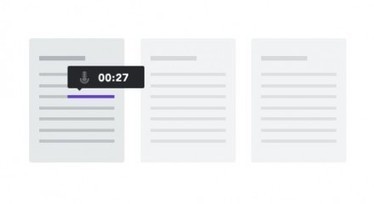
Aunque admite realizar comentarios de texto, el punto fuerte de Kaizena (kaizena.com) es dar feedback en Google Drive usando la voz en los documentos.See it on Scoop.it, via TIC & Educación
Continuar leyendo: Kaizena, para poner comentarios con voz en los textos de Google Drive
Fuente: Tic&Educación
See it on Scoop.it, via Educacion, ecologia y TIC
Continuar leyendo: Blogger: Blogger y Google Drive Formularios
Fuente: Educación y Ecología
Aplicaciones Educativas de Google Raúl Diego ObregónSee it on Scoop.it, via TIC & Educación
Continuar leyendo: Manual de Google Drive
Fuente: Tic&Educación
I was excited to see my Google Docs Glog featured in a post by Jeff Dunn on Edudemic last month. This morning it has been getting some attention on Facebook and Twitter, so I thought it would be a good idea to direct the readers of this blog to the post, 12 Effective Ways to Use Google Drive in Education.See it on Scoop.it, via TIC & Educación
Continuar leyendo: Google Docs for Learning Glog on Edudemic
Fuente: Tic&Educación
See it on Scoop.it, via Educacion, ecologia y TIC
Continuar leyendo: TIC: Pasar de Pdf a Doc con Google Drive
Fuente: Educación y Ecología
I just learned through a tweet by Noami Harm about this Google Drive document featuring a wide variety of Chrome extensions and apps. Some of the extensions you will find in her document have already been featured here inEducational Technology and Mobile Learning in the section entitled ” Chrome Extensions for Teachers”, however, having all this aggregation of awesome educational extensions and apps amassed in one single page is a great thing.See it on Scoop.it, via…
Continuar leyendo: Handy Chrome Extensions and Apps for Teachers
Fuente: Tic&Educación
Google Takeout is a service that allows you to create an archive of all your Google Drive data and store it on your computer for offline access. if you do not trust the cloud and you want your data saved in a physical memory storage device, Google Takeout is definitely the answer.Google Takeout works only with products and services owned by Google such as Google Drive, YouTube, Contacts, Voice, Hangouts, Blogger, Location History…etc. Besides being able …
Continuar leyendo: Download All your Google Drive Data with One Click
Fuente: Tic&Educación