Artículos con la etiqueta ‘google docs’

4 Minutes Guide to Creating Graphs and Charts in Google Spreadsheets

After posting about the recent updates to Google Sheets, I received an email from one of my readers here inEducational Technology and Mobile Learning asking about how to create a chart in a Google Spreadsheet. Looking into my archive I found out this video tutorial provided by John Sowash . The tutorial which is 4 minutes long will walk you through a step by step process of how to use the intuitive chart editor to create and insert colourful…

Continuar leyendo: 4 Minutes Guide to Creating Graphs and Charts in Google Spreadsheets

Fuente: Tic&Educación
¿Podrá Google Docs “matar” a Microsoft Office? | Geeky Theory

La guerra está lejos de terminar, pero Microsoft ha mejorado su labor, sabe que esta batalla será librada y ganada en la nube.See it on Scoop.it, via Educacion, ecologia y TIC

Continuar leyendo: ¿Podrá Google Docs “matar” a Microsoft Office? | Geeky Theory

Fuente: Educación y Ecología

Student Feedback from a Google Doc – A Workflow

There are many workflows for giving students feedback. This is simply one. Assuming you have the students Google Docs in a folder or some other way of easily allowing you to access each students assignment you will want to insert comments. Assuming the student is implicitly shared on the document they will receive an email notification.See it on Scoop.it, via TIC & Educación

Continuar leyendo: Student Feedback from a Google Doc – A Workflow

Fuente: Tic&Educación

The Best Thing To Ever Happen To Google Drive For Teachers

First came cloud-based word processing in the form of Google Docs.With cloud-based word processing in education, teachers could remotely access student work, students (provided they had internet access and had a Google account) could retrieve their work from anywhere, and writers could collaborate in real-time with their peers to double-team the pain-staking work that is the writing process.See it on Scoop.it, via TIC & Educación

Continuar leyendo: The Best Thing To Ever Happen To Google Drive For Teachers

Fuente: Tic&Educación

Google Docs for Learning Glog on Edudemic

I was excited to see my Google Docs Glog featured in a post by Jeff Dunn on Edudemic last month. This morning it has been getting some attention on Facebook and Twitter, so I thought it would be a good idea to direct the readers of this blog to the post, 12 Effective Ways to Use Google Drive in Education.See it on Scoop.it, via TIC & Educación

Continuar leyendo: Google Docs for Learning Glog on Edudemic

Fuente: Tic&Educación
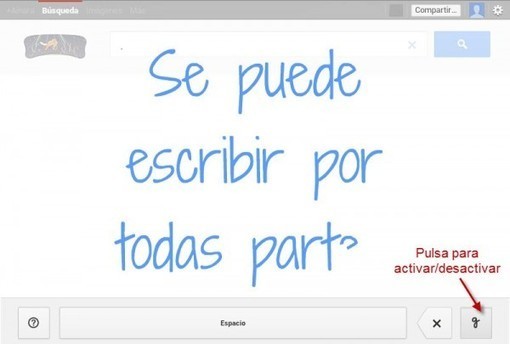
GMail y Google Docs ahora permiten escritura a mano

Google ha anunciado que dos de sus servicios más importantes se unirán a la “era” de la llamada escritura a mano.See it on Scoop.it, via Recull diari

Continuar leyendo: GMail y Google Docs ahora permiten escritura a mano

Fuente: Recull Diari

Adding Comments to a Google Doc

One of the best things about Google Docs is the ability to collaborate. For my classes students will create their assignments in a Google Doc and share it with me with edit or comment only rights. …See it on Scoop.it, via TIC & Educación

Continuar leyendo: Adding Comments to a Google Doc

Fuente: Tic&Educación

Herramientas para trabajar en grupo desde casa

Estas herramientas para trabajar en grupo nos permiten hacer nuestras tareas desde nuestra casa, de forma freelance, pero sin perder la organización.Gumersindo Fernández’s insight:Google DocsTrelloWunderlistIQTELLWrikeSeaCloudHightrackSee it on Scoop.it, via TIC & Educación

Continuar leyendo: Herramientas para trabajar en grupo desde casa

Fuente: Tic&Educación

Las entradas de escritura manual llegan a GMail y Google Docs

Google acaba de anunciar de la llegada de la entrada de datos a través de la escritura manual en sus servicios de Google Docs y GMail, enfocado en aquellos casos en los que la entrada de datos a través del teclado es menos ideal que escribirlos de puño y letra, pudiendo para ello utilizar tanto el propio ratón, trackback, o cualquier otro soporte electrónico que permita realizar escrituras manuales. Con ello, persigue romper las barreras …

Continuar leyendo: Las entradas de escritura manual llegan a GMail y Google Docs

Fuente: Tic&Educación

Blogger y Google Drive Formularios

Encuestas, solicitud de presupuestos, pedidos, reservas, envío de datos de contacto, notificación, incidencias, envío de sugerencias, introducción de métricas, etc. En definitiva, hablamos de Formularios web. Tras ver cómo integrar Google Calendar y Google Docs Hojas de cálculo con Blogger, le ha llegado el turno a los Google Docs Formularios. Recuerda que esta publicación forma parte de una serie de artículos dedicados a la integración de Blogger con otros …

Continuar leyendo: Blogger y Google Drive Formularios

Fuente: Tic&Educación

Creating Mind Maps in Google Draw

Why use Google Draw rather than other mind mapping tools? Google Draw is collaborative and is in my Google Drive with the rest of my files, thus easy to find. Teachers can also insert comments on a Google Draw as you can in other Google Docs, so it makes for a nice tool for being able to give feedback.See it on Scoop.it, via TIC & Educación

Continuar leyendo: Creating Mind Maps in Google Draw

Fuente: Tic&Educación
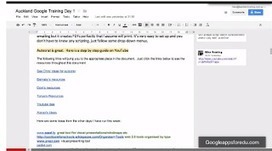
This is How to Insert A Bookmark in A Google Doc

Today I am sharing with you an interesting tip to use when you are writing a document on Google Doc. This tip is provided by Google Apps for education and it is all about inserting bookmarks in Google Docs. If you are writing long stretches of text in a document and you want to create links to make it easy for people to check different parts of your document then you need to insert a bookmark.See it…

Continuar leyendo: This is How to Insert A Bookmark in A Google Doc

Fuente: Tic&Educación

Tus archivos disponibles donde quieras

A todos nos ha sucedido que hemos dedicado horas a armar archivos para nuestros alumnos y luego tanto esfuerzo nos hemos olvidado el Pen Drive, el lector no lee el DVD, o justo nos faltó un poquito para terminarlo y tenemos todo en casa. (¡Dolor de cabeza!).Para solucionar estos problemas cotidianos se han diseñado sistemas que permiten que en el momento en en que guardamos nuestros trabajos en casa, también queden resguardados en la nube. Es decir, que…

Continuar leyendo: Tus archivos disponibles donde quieras

Fuente: Docente2punto0.blogspot.com