Artículos con la etiqueta ‘google docs’

Analiza tu competencia formulando en Google Docs

A la hora de hacer un análisis competitivo muchas veces nos enfrascamos en utilizar demasiadas herramientas que complican y alargan este proceso. Si tienes poco tiempo y quieres obtener información clara y rápida es una de las mejores opciones.See it on Scoop.it, via TIC & Educación

Continuar leyendo: Analiza tu competencia formulando en Google Docs

Fuente: Tic&Educación

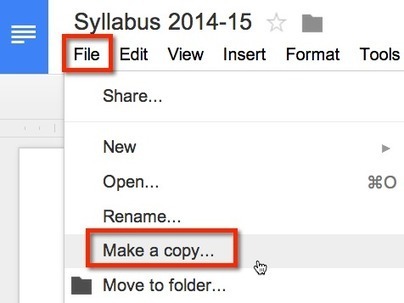
Google Docs: File Make a Copy

When sharing Google Docs with students one trick is to have the students make a copy. Sharing Settings In the upper right hand corner of a Google Doc is the blue share button. Click on this to chan…See it on Scoop.it, via TIC & Educación

Continuar leyendo: Google Docs: File Make a Copy

Fuente: Tic&Educación
New- Receive Notifications for Audio Comments on Google Docs and Presentations

Kaizena is one of the best tools that you can use to add audio comments to students work on both Google Documentsand Google Presentations. To use Kaizena , you need to be logged in to your Google account and just like any other third party application, to integrate Kaizena into your Google Docs you will have to grant it access to your Drive. Here is a good video Richard shared on his post, watch it to learn …

Continuar leyendo: New- Receive Notifications for Audio Comments on Google Docs and Presentations

Fuente: Tic&Educación

Usos creativos de Padlet en el aula│@jhergony

Padlet , anteriormente Wallwisher, es un espacio web donde se puede añadir archivos, enlaces, vídeos, etc. Puede crear varias paredes para añadir tu contenido favorito.Padlet actúa como una pared interactiva en la que se van colgando materiales. Es una manera más visual de colaborar que Google Docs y posee características de colaboración en tiempo real de las que carece Glogster.See it on Scoop.it, via Recull diari

Continuar leyendo: Usos creativos de Padlet en el aula│@jhergony

Fuente: Recull Diari

Kaizena Adds Built-in Notifications for Voice Comments on Google Docs and Presentations

Kaizena is a fantastic tool for adding voice comments to Google Documents and Google Presentations. The latest update to Kaizena streamlines feedback notifications.See it on Scoop.it, via TIC & Educación

Continuar leyendo: Kaizena Adds Built-in Notifications for Voice Comments on Google Docs and Presentations

Fuente: Tic&Educación

3 Useful Google Docs Add-Ons

Google Docs Add-Ons are new tools created by 3rd party developers that add functionality to Google Docs. Users can access and search for Add-Ons through the menu bar in any Google Doc or Spreadsheet. There are many handy tools to Add-On to Google Docs to improve efficiency and help get work done, and there is even a section for education. Here are a three of my favorite Add-Ons, which I believe are well-suited for teachers…

Continuar leyendo: 3 Useful Google Docs Add-Ons

Fuente: Tic&Educación
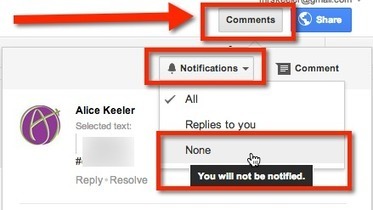
Google Docs: Stop Email Notifications

If you are shared on a Google document with a large group of people you may find the number of email notifications from collaborators inserting comments to be overwhelming. I like my students to receive the email notifications when I give them individual feedback, however, when collaborating with a large group this may be unnecessary.See it on Scoop.it, via TIC & Educación

Continuar leyendo: Google Docs: Stop Email Notifications

Fuente: Tic&Educación

10 Things Every Teacher Should Know How To Do With Google Docs

Google Docs is a powerful word processing tool that many schools have adopted. As it’s similar to Microsoft Word and other word processing tools, most of its features are intuitive to use. However, in addition to completing many of the functions of a traditional word processor, Google Docs provides even more capabilities that can be invaluable to educators. Here are ten tricks that can make your life easier with Google Docs.See it on Scoop.it, via TIC &amp…

Continuar leyendo: 10 Things Every Teacher Should Know How To Do With Google Docs

Fuente: Tic&Educación
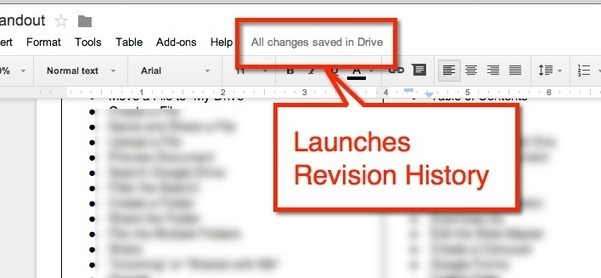
Google Doc Tip: Find Revision History

If you are using Google Docs, Sheets, Slides or Draw you will notice next to the menu options is a message letting you know that your document is saved in Google Drive.See it on Scoop.it, via TIC & Educación

Continuar leyendo: Google Doc Tip: Find Revision History

Fuente: Tic&Educación

An Excellent New Feature for Google Docs

A few days ago Google released a few interesting updates to its Drive applications. One important update that I want to share with you today is called “Suggested Edits”. This new feature is great for collaborative work on Google Docs. Before, when you share a Google document with your collaborators and grant them the editing rights they can edit anything in it. But with “Suggested Edits” you, as the owner of the document, can control this editing process by allowing…

Continuar leyendo: An Excellent New Feature for Google Docs

Fuente: Tic&Educación

Use Google Docs to Convert Images and PDFs to Editable Text

Here is a great Google Doc tip that helps me a lot with my studies in university. As a graduate student, most of my reading assignments and hand-outs come in the form of PDFs and some of these documents are only scanned versions of the original documents. Often times, these PDFs are low-quality as they are poorly scanned which makes reading them a real pain in the butt. Also, scanned PDFs do not allow …

Continuar leyendo: Use Google Docs to Convert Images and PDFs to Editable Text

Fuente: Tic&Educación

How to Make PDFs Editable With Google Docs

Do you have a PDF file that contains text you want to edit? While you can’t edit the file itself, you can use Google Drive to extract the text from a PDF file and place it into a normal document, which you can then edit and format it…See it on Scoop.it, via TIC & Educación

Continuar leyendo: How to Make PDFs Editable With Google Docs

Fuente: Tic&Educación

15 Effective Ways to Use Google Docs in Class

I spend a considerable time every single day browsing the net tracking new updates in the world of educational technology and, often times, in the midst of this journey I would come across wonderful resources and tutorials that usually end up in one of my posts here in this blog. So after the previous guide on how to be a Google Drive master , today I am sharing with you another awesome guide created by Eric Curts entitled “The …

Continuar leyendo: 15 Effective Ways to Use Google Docs in Class

Fuente: Tic&Educación
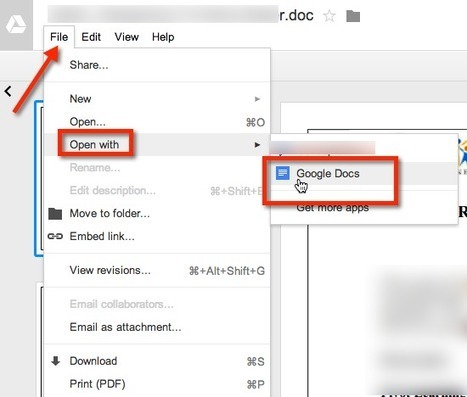
Open Word Documents in Google Drive

If you have uploaded a Word or Office document to your Google Drive it is not editable in Google Drive. If you convert it to Google Docs, Google Drive will make a COPY of the file and convert it. If you are looking at the document in Google Drive simply use the File menu and choose to “Open with” “Google Docs.”See it on Scoop.it, via TIC & Educación

Continuar leyendo: Open Word Documents in Google Drive

Fuente: Tic&Educación
¿Qué utilidades tiene Google Apps en el entorno educativo?

Google Apps incluye herramientas como un correo electrónico gratuito basado en la web, un calendario, y documentos, a los que se puede acceder desde cualquier lugar y en cualquier momento. Pero, ¿qué aplicaciones tiene en el entorno educativo? Herramienta colaborativa Colaboración rápida y sencilla. Sobre esta base se sustenta la utilidad de Google Apps en la educación. Y es que tanto la web como las herramientas de creación de ficheros incluyen la edición en tiempo real, herramientas de control para funciones …

Continuar leyendo: ¿Qué utilidades tiene Google Apps en el entorno educativo?

Fuente: Educaciontrespuntocero.com
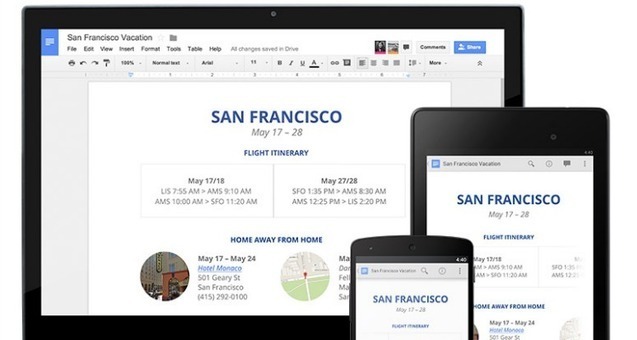
Cómo insertar imágenes a un documento sin salir de Google Docs

Google Docs es una gran alternativa para redactar información. Solo con tu cuenta de Google podrás almacenar documentos de texto y compartirlos en la web o redes sociales.See it on Scoop.it, via TIC & Educación

Continuar leyendo: Cómo insertar imágenes a un documento sin salir de Google Docs

Fuente: Tic&Educación

Teacher’s Visual Guide on Giving Audio Feedback to Students on Google Drive

One of the best tools teachers can use to give both audio and textual feedback on students Google documents is called Kaizena. I have featured this tool in several posts in the past and today I am sharing with you this simple step by step guide to show you how you can actually use kaizena to provide feedback on students documents that have been created through Google Docs. I am also featuring three important updates Kaizena has added …

Continuar leyendo: Teacher’s Visual Guide on Giving Audio Feedback to Students on Google Drive

Fuente: Tic&Educación

Add-on Review: g(Math) for Google Documents

In this previous post I briefly described the built-in tools that Google Docs offers for adding mathematical equations to your documents.The g(Math) add-on, available via the Add-ons > Manage add-ons menu in your document, takes things a big step further by adding more advanced expression editing along with graph generation. If you use a lot of mathematics, this could be for you.See it on Scoop.it, via TIC & Educación

Continuar leyendo: Add-on Review: g(Math) for Google Documents

Fuente: Tic&Educación
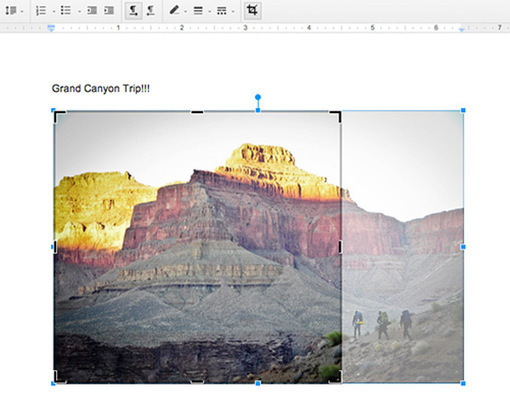
Cómo cortar, rotar y añadir bordes a tus imágenes en Google Docs

¿Sabías que desde Google Docs se pueden cortar, rotar y añadir diferentes bordes a tus imágenes, sin necesidad de acudir a otros programas? Te contamos cómo hacerlo en unos sencillos pasos.See it on Scoop.it, via TIC & Educación

Continuar leyendo: Cómo cortar, rotar y añadir bordes a tus imágenes en Google Docs

Fuente: Tic&Educación
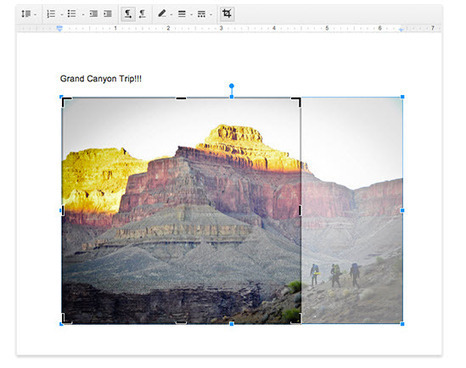
Google Docs: ya podemos recortar, girar y añadir bordes a las imágenes

Buenas noticias de parte del equipo de Google para los usuarios intensivos de Google Docs, ya que encontraremos nuevas funciones al momento de integrar imágenes.See it on Scoop.it, via Educacion, ecologia y TIC

Continuar leyendo: Google Docs: ya podemos recortar, girar y añadir bordes a las imágenes

Fuente: Educación y Ecología