Artículos con la etiqueta ‘google drive’

Google Drive ahora tiene un botón que facilita el compartir documentos
Google drive añade un nuevo botón para que sea más sencillo compartir los documentos, hojas de cálculo o presentaciones con nuestros contactosSee it on Scoop.it, via TIC & Educación

Continuar leyendo: Google Drive ahora tiene un botón que facilita el compartir documentos

Fuente: Tic&Educación

5 Extensiones para mejorar tu productividad en Google Drive

Ahora queremos dejaros una lista con 5 extensiones para que mejores tu productividad en el popular servicio Google DriveSee it on Scoop.it, via TIC & Educación

Continuar leyendo: 5 Extensiones para mejorar tu productividad en Google Drive

Fuente: Tic&Educación

5 Good Extensions to Enhance Your Google Drive Productivity

Since the time Google made it possible for third party developers to create extensions and add-ons compatible with Chrome and the Chrome app store is teeming with all kinds of apps. If you have a look at the Drive section in the Chrome store you will notice a multitude of apps provided there for free , however, many of these apps are not really worth installing. In this regard and if you are looking for powerful Drive extensions to maximize …

Continuar leyendo: 5 Good Extensions to Enhance Your Google Drive Productivity

Fuente: Tic&Educación
3 grandes usos de Google Drive que te sorprenderán

Google Drive comenzó como Google Docs, y Google Docs era un servicio para mantener una oficina en la nube. En ese sentido, lo mas habitual es que guardemos en Google Drive documentos de texto, hojas de cálculo o presentaciones, pero Drive no se limita necesariamente a eso. A continuación os ofrecemos tres usos diferentes que no implican ninguno de esos aburridos archivos de trabajo.See it on Scoop.it, via TIC & Educación

Continuar leyendo: 3 grandes usos de Google Drive que te sorprenderán

Fuente: Tic&Educación
¿Cómo usar Google Drive para trabajar de forma colaborativa? [video]

Un interesante video donde nos enseñan a trabajar de forma colaborativa utilizando Google driveSee it on Scoop.it, via TIC & Educación

Continuar leyendo: ¿Cómo usar Google Drive para trabajar de forma colaborativa?

Fuente: Tic&Educación

Google Drive: Collaborating with others

Google Drive has some wonderful features that enhance collaborative and group work. The video below by Andrew Boan walks you through the different collaborative features in Drive and shows you how to use each one of them. Some of the things Boan covers in this tutorial include:How to create a shared folderHow to share the folder with othersAdd a file to a shared folderUpload a file directly into the shared folderHow to create and share a…

Continuar leyendo: Google Drive: Collaborating with others

Fuente: Recull Diari

New Google Drive: Using an Office Document

Very likely you have office Documents or someone will send you an Office document. If you are a Google Drive user you might want to utilize your Office Documents in Google Drive.See it on Scoop.it, via TIC & Educación

Continuar leyendo: New Google Drive: Using an Office Document

Fuente: Tic&Educación

Step by Step Guide on How to Use Google Drive to Collaborate With Others

Google Drive has some wonderful features that enhance collaborative and group work. The video below by Andrew Boan walks you through the different collaborative features in Drive and shows you how to use each one of them.See it on Scoop.it, via TIC & Educación

Continuar leyendo: Step by Step Guide on How to Use Google Drive to Collaborate With Others

Fuente: Tic&Educación

Use Google Drive to Share Videos Privately

Google Drive is full of options that often go overlooked. One of those options is privately sharing videos. To share videos through Google Drive upload them to your Google Drive account, preview them, then share by using the sharing options at the top of the preview screen. The sharing options allow you specify who can access the video. The screenshots below outline the process. (Click the images to view them in full size).See it on Scoop.it, via …

Continuar leyendo: Use Google Drive to Share Videos Privately

Fuente: Tic&Educación
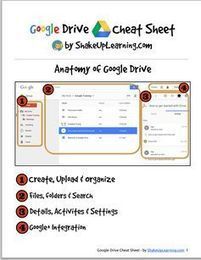
Excellent Google Drive Resources for Teachers

On the occasion of the first back-to-school week, I compiled this list of excellent resources to help teachers make the best of Google Drive in their classrooms. I firmly believe that Google Drive is one of the elemental web tools with huge educational potential that every teacher should be able to tap into. However, the thing with so many of Google’s services is that their power and usefulness lies in their hidden features. The resources below cover …

Continuar leyendo: Excellent Google Drive Resources for Teachers

Fuente: Tic&Educación

This is How to Grade Students Work on Google Drive

Goobric is an interesting Chrome extension that allows teachers to easily grade students work by using rubrics. Goobric helps you grade any work that is created and delivered through one of Google Drive’s services ( documents, Presentations, Spreadsheets, Folders, etc). Up to now, Goobric supports only works created via the Doctopus Scriptwhich is a “a tool for differentiating, grouping, distributing and managing student projects in google Drive. Doctopus is available from any Google Spreadsheet from the…

Continuar leyendo: This is How to Grade Students Work on Google Drive

Fuente: Tic&Educación
Google Drive: Uso educativo y trabajo en el aula

En este sitio vamos a compartir informaciones, ideas y experiencias en el aula relacionadas con las aplicaciones de Google Drive.See it on Scoop.it, via Recull diari

Continuar leyendo: Google Drive: Uso educativo y trabajo en el aula

Fuente: Recull Diari

Conoce a los usuarios que acceden a tus documentos en Drive

Google Drive es una excelente herramienta de almacenamiento en la nube que tiene soporte para el uso compartido de material en la red. Esta función es lo que permite tener un historial de uso de los datos gracias a la aplicación WhoHasAccess.See it on Scoop.it, via TIC & Educación

Continuar leyendo: Conoce a los usuarios que acceden a tus documentos en Drive

Fuente: Tic&Educación

MultCloud: Agrega todos tus archivos de Google Drive o SkyDrive en un solo lugar

Si eres un docente que gestiona muchos archivos en la nube y cuentas con mas de un servicio de almacenamiento y entre los cuales se encuentra Box, Google Drive, Dropbox, SkyDrive y otros. Pues ahora podrás tener todos tus archivos en un solo panel de control y como si fuera poco MultCloud nos ofrece los mecanismos necesarios para la carga y descarga de archivos, e incluso nos permite crear carpetas, con lo cual el orden estará asegurado. Además…

Continuar leyendo: MultCloud: Agrega todos tus archivos de Google Drive o SkyDrive en un solo lugar

Fuente: Tic&Educación

Google mejora la presentación de documentos y hojas de cálculo

Google mejora la presentación de sus Documentos, Slides y Hojas de Cálculo. Los sitios para hallar el material publicado en Google Drive muestran la vista previa de los documentos.See it on Scoop.it, via TIC & Educación

Continuar leyendo: Google mejora la presentación de documentos y hojas de cálculo

Fuente: Tic&Educación

All The New Google Drive Updates Teachers Should Know about

Google has recently released some important updates to its Google Drive. I have already covered each of these updates in separate posts but for those of you who haven’t seen them yet, the list below aggregates all of these updates in one single place.See it on Scoop.it, via TIC & Educación

Continuar leyendo: All The New Google Drive Updates Teachers Should Know about

Fuente: Tic&Educación

New Google Drive Tip- Publish Google Docs As Web Pages

Here is another handy Google Drive tip that is often overlooked by many teachers. Did you know that you can publish a Google Doc, presentation or sheet as a web page? Yes you can write a document or create a presentation and share it as a web page that students can access using the URL you share with them. Here is how to do it:Open the document you want to publish as a web page…

Continuar leyendo: New Google Drive Tip- Publish Google Docs As Web Pages

Fuente: Tic&Educación