Cómo capturar la pantalla y editar la imagen con Nimbus Screen Capture

Continuar leyendo: Cómo capturar la pantalla y editar la imagen con Nimbus Screen Capture
Fuente: Tic&Educación

Continuar leyendo: Cómo capturar la pantalla y editar la imagen con Nimbus Screen Capture
Fuente: Tic&Educación

Continuar leyendo: 3 Powerful Apps for Creating Green Screen Videos with Students
Fuente: Tic&Educación

Continuar leyendo: Student Created Videos: Google Slides and Screencasting
Fuente: Tic&Educación

Continuar leyendo: How to Use Green Screen Effects on iPads
Fuente: Tic&Educación
 Solar System es una aplicación que ayuda a introducir en las clases de ciencias de Primaria el contenido curricular relacionado con el Sistema Solar. Desarrollada por Arloon, permite conocer con detalle cada uno de los planetas del Sistema Solar, aprendiendo sobre su tamaño, órbita, distancia al Sol y composición. Además, hace especial hincapié en la relación entre el Sol, la Tierra y la Luna, para que los alumnos aprendan de forma interactiva cómo se producen los eclipses, …
Continuar leyendo: Los planetas ‘invaden’ el aula con la app Solar System
Fuente: Educaciontrespuntocero.com

Continuar leyendo: Two Great Apps for Creating Educational Screencasts on Chrome
Fuente: Tic&Educación

Continuar leyendo: How to Use Handwriting in Google Documents
Fuente: Tic&Educación
 ¿Quieres aprender a resolver sistemas de ecuaciones? ¿Quieres conocer el desarrollo completo paso por paso?Matemáticas Ecuaciones es una aplicación simple e intuitiva para resolver sistemas de ecuaciones lineales de dos ecuaciones con dos incógnitas mediante los siguientes métodos:IgualaciónSustituciónReducciónDeterminantes (Regla de Cramer)El autor de la aplicación se nos comparte lo siguiente:Soy profesor de informática y desarrollo aplicaciones móviles.He desarrollado una aplicación llamada “Matemáticas Ecuaciones”. Su utilidad principal es resolver sistemas de ecuaciones lineales con dos incógnitas …
Continuar leyendo: Aplicación para resolver sistemas de ecuaciones (para Android)
Fuente: Docente2punto0.blogspot.com

Continuar leyendo: How to Create a Simple Check Out / Check In System in Google Forms
Fuente: Tic&Educación

Continuar leyendo: Before You Embed That Gadget or Badge or Infographic…
Fuente: Tic&Educación
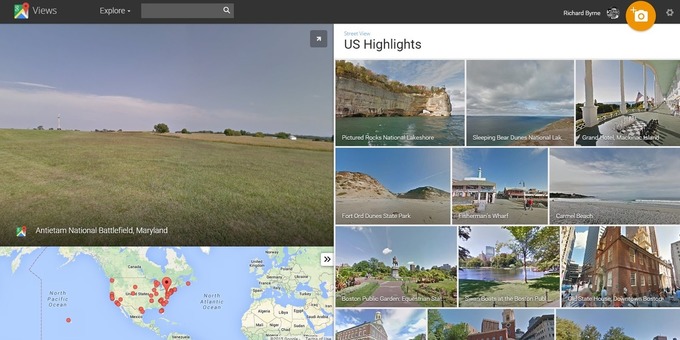
Continuar leyendo: How to Embed Google Street View Imagery Into Your Blog Posts
Fuente: Tic&Educación

Continuar leyendo: 5 Things You Did Not Know About Google Forms
Fuente: Tic&Educación

Continuar leyendo: Screencastify 1 extensión chrome grabador de pantalla
Fuente: Tic&Educación

Continuar leyendo: How to Add Annotations to YouTube Videos
Fuente: Tic&Educación
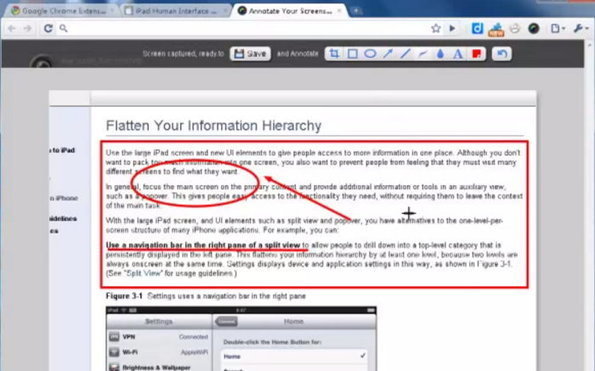
Continuar leyendo: Captura, anota y comparte la pantalla de tu navegador Chrome, Firefox o Safari
Fuente: Tic&Educación

Continuar leyendo: Screenr – yalocinb: Enlaces en un libro de moodle
Fuente: Recull Diari
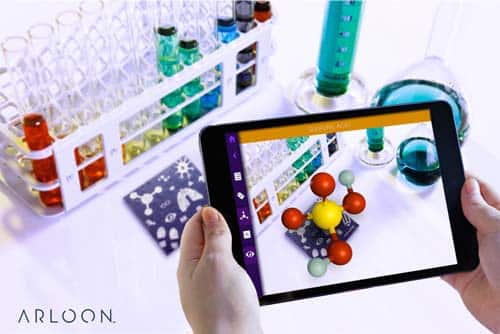 Chemistry es una aplicación de Arloon que presenta la formulación química de una forma innovadora, utilizando un método interactivo para aprender a formular y nombrar los compuestos químicos. Con esta aplicación los alumnos tienen a su disposición la tabla periódica de forma completa para formular, con total libertad, los compuestos binarios y ternarios adecuados a su nivel. Además, ayuda a aprender las bases teóricas y reglas de formulación (marcadas por la IUPAC) mediante sencillos tutoriales y a practicar todo …
Continuar leyendo: Chemistry, la app para transformar las clases de química en Secundaria
Fuente: Educaciontrespuntocero.com

Continuar leyendo: Cosas a evitar en una presentación: imágenes prediseñadas
Fuente: Tic&Educación

Continuar leyendo: TED sobre Educación Emocional
Fuente: educacioncuatropuntocero.wordpress.com
 El Colegio La Salle-Maravillas lleva tres cursos utilizando Snappet, un sistema de aprendizaje para Matemáticas, Lengua e Inglés en Primaria. Juanjo Cerrajero, el jefe de estudios, nos cuenta los resultados. La tecnología está cambiando la forma en que profesores y alumnos interactúan, y de igual modo permite que los docentes demos una respuesta más eficaz a las necesidades educativas de cada uno de nuestros alumnos, consiguiendo así que sea el protagonista de su aprendizaje. Hace dos años que …
Continuar leyendo: El alumno, protagonista de su aprendizaje con Snappet
Fuente: Educaciontrespuntocero.com