Artículos con la etiqueta ‘screenshots’

Two Great Apps for Creating Educational Screencasts on Chrome

Following the post we shared a few days ago featuring some powerful Chrome apps for taking screenshots, today we are sharing with you two great tools you can use on your Chrome to record screencasts.These web based apps will provide you with an easy way to create educational tutorials and step by step guides to share with your students.See it on Scoop.it, via TIC & Educación

Continuar leyendo: Two Great Apps for Creating Educational Screencasts on Chrome

Fuente: Tic&Educación

How to Use Handwriting in Google Documents

Earlier this week John Stevens tipped me off to using g(Math) to add handwritten responses to Google Forms. This morning John sent me a direct message on Twitter to tell me that you can now use handwriting in Google Documents through the g(Math) Add-on. John wrote out step-by-step directions with screenshots here. I made a short screencast of the process. That screencast is embedded below.See it on Scoop.it, via TIC & Educación

Continuar leyendo: How to Use Handwriting in Google Documents

Fuente: Tic&Educación

A Short Guide to Taking Screenshots on Your Laptop and Tablet

Visual aids can be very helpful when you’re introducing a new website, app, or software to students or colleagues. Being able to take and send a screenshot is also helpful when you’re trying to explain a problem to your tech support person. Here’s a short guide to taking screenshots on your iPad, Android tablet, Windows computer, Mac, or Chromebook.See it on Scoop.it, via TIC & Educación

Continuar leyendo: A Short Guide to Taking Screenshots on Your Laptop and Tablet

Fuente: Tic&Educación

Aplicaciones para hacer capturas de pantalla y anotar en ellas

Sea para lo que sea, poder hacer screenshots o capturas de pantalla a nuestro terminal es realmente útil, y si además las editamos y enviamos sobre la marcha, muchísimo mejor. Estos consejos y lista de aplicaciones para hacer una captura de pantalla y editarla esperan hacerte tu día a día mucho más productivo.See it on Scoop.it, via TIC & Educación

Continuar leyendo: Aplicaciones para hacer capturas de pantalla y anotar en ellas

Fuente: Tic&Educación
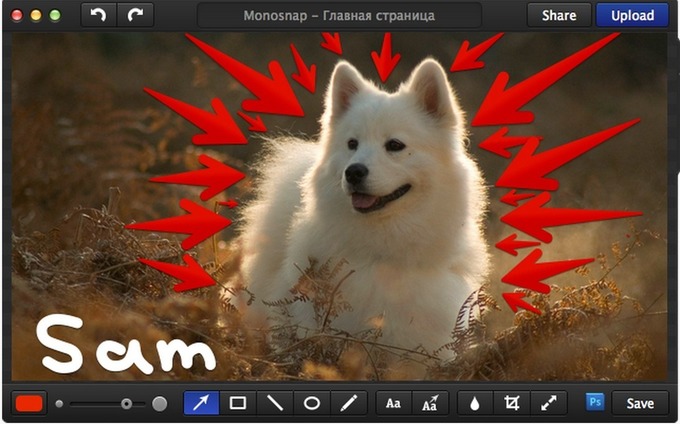
The Best Teacher Tools for Taking Screenshots and Annotating Pictures

Today, we are introducing you to what we consider to be the best 4 web tools for creating screenshots. Besides being free, these tools are very simple to use and are also student friendly. They will allow you to capture your screen, crop and annotate your pictures using arrows, colours, shapes, text and many more.See it on Scoop.it, via TIC & Educación

Continuar leyendo: The Best Teacher Tools for Taking Screenshots and Annotating Pictures

Fuente: Tic&Educación

How to Add Fonts to Google Documents & Slides

To access and add custom fonts to your Google Drive Documents and Slides select “add fonts” from the bottom of the font selection menu that you’ve always used in Google Drive. Selecting “add fonts” will open up a new menu in which you can mix and match fonts to your heart’s content. The screenshots below provide visual directions.See it on Scoop.it, via TIC & Educación

Continuar leyendo: How to Add Fonts to Google Documents & Slides

Fuente: Tic&Educación
Cómo capturar screenshots de sitios web desde el navegador

En muchas ocasiones, sobre todo si eres blogger, te encontrarás con la necesidad de tomar un screenshot de una determinada página o web. Lo cierto es que podemos encontrar muchas herramientas con las que resulta sencillo capturar la imagen de cualquier página o sitio web, hoy vamos a enseñaros un truco con el que no vais a necesitar ninguna aplicación.See it on Scoop.it, via TIC & Educación

Continuar leyendo: Cómo capturar screenshots de sitios web desde el navegador

Fuente: Tic&Educación