Archivo de la Categoría ‘Texto a voz’

4 of The Best Text to Speech Apps for Android

Text to speech technology was initially used on computers to provide help for those with visual impairments. Now with the advance of technology and the widespread of mobile gadgets, text to speech softwares are being used for a wide variety of purposes some of which are purely educational such as learning a foreign language, reading books out loud and many more.See it on Scoop.it, via TIC & Educación

Continuar leyendo: 4 of The Best Text to Speech Apps for Android

Fuente: Tic&Educación

Add a Text to Speech Function to Your Browser

Announcify is a free text to speech application that is available as a Chrome browser extension. With Announcify installed in your browser any time you’re viewing a webpage you can simply click on the Announcify icon in your browser and have the text of the page read to you. A bonus aspect of using Announcify is that in order to make a webpage easier to read it enlarges the text of the webpage and removes all sidebar content. In…

Continuar leyendo: Add a Text to Speech Function to Your Browser

Fuente: Tic&Educación

Top 10 Text To Speech (TTS) Software For eLearning

There are several reasons why you should consider using text to speech software for your eLearning courses; converting words into speech accommodates learning difficulties, develops speech and literacy skills, and allows for different paces to work with. In this article I will share the best text to speech software for eLearning, so that you can be able to explore your options and select the right text to speech software for you.See it on Scoop.

Continuar leyendo: Top 10 Text To Speech (TTS) Software For eLearning

Fuente: Tic&Educación

3 Good Text to Speech Tools for Struggling Readers

We have received a few requests over the last couple of weeks to share our recommendations for text to speech tools designed specifically for struggling readers.While all text to voice converters can be used by both struggling and non struggling readers, the tools listed below are reputed for being effective with kids with reading disorders. Natural Reader is not free but it does offer a free trial period to test the application and decide …

Continuar leyendo: 3 Good Text to Speech Tools for Struggling Readers

Fuente: Tic&Educación
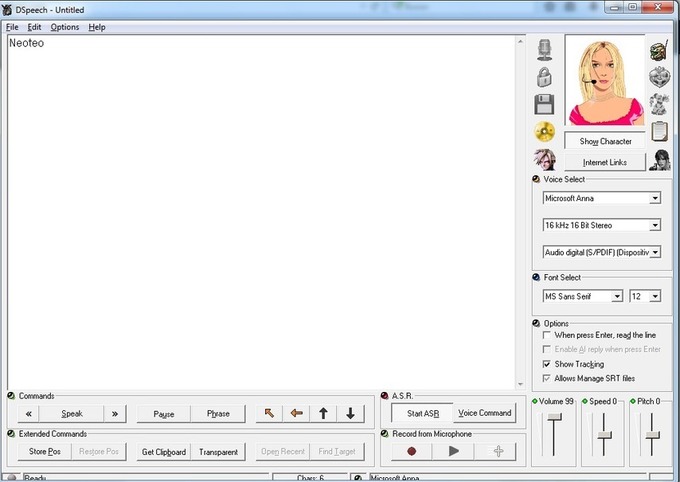
Herramienta para pasar de texto a voz

DSpeech es una aplicación de Text To Speech, o más conocida como una herramienta de conversión de texto a voz. De esta manera la aplicación podrá pasar a audio lo que tú vas escribiendo en su interfaz.Además la utilidad tiene integrada la función RAH (Reconocimiento automático del habla), de esta manera ahorrarás tiempo en la configuración del servicio.See it on Scoop.it, via TIC &

Continuar leyendo: Herramienta para pasar de texto a voz

Fuente: Tic&Educación

Two of The Best Text to Speech Tools for Teachers

Below are two of the best text to speech apps out there. We have already reviewed these apps in previous posts and today we have them in one list for you to try and choose the one you like. These add-ons have integrated iSpeech technology which allows them to read any text you select for them. Watch the attached videos to see how each one of them works.See it on Scoop.it, via TIC

Continuar leyendo: Two of The Best Text to Speech Tools for Teachers

Fuente: Tic&Educación
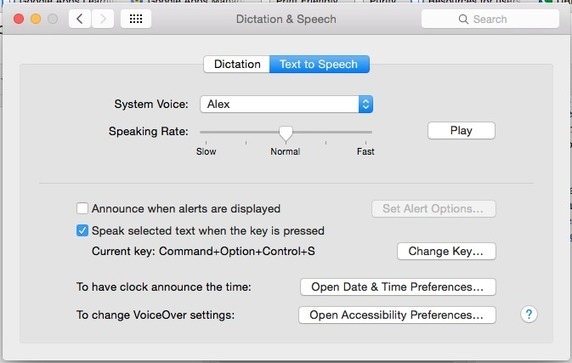
Text to Speech in Google Earth

Recently, some of our 6th graders came into the computer lab to do research using Google Earth. The teachers on the 6th grade team had spent many hours digitizing curriculum and making Google Earth Tours (.kmz files) for their students as it is a wonderful way for students to experience the world around them.See it on Scoop.it, via TIC & Educación

Continuar leyendo: Text to Speech in Google Earth

Fuente: Tic&Educación

How to Use Text-to-Speech to Post Audio Messages on Your Blog

AudioPal is a free service that anyone can use to create short audio messages to embed into blog posts. AudioPal offers three way to create messages. You can record using the microphone connected to your computer. You can record by calling AudioPal’s phone system. Or you can create a message by using AudioPal’s text-to-speech function. In the video that is embedded below I demonstrate how to use AudioPal’s text-to-speech function and how…

Continuar leyendo: How to Use Text-to-Speech to Post Audio Messages on Your Blog

Fuente: Tic&Educación