Artículos con la etiqueta ‘students’

Three Things to do With QR Codes On Back-to-School Night

At back-to-school night parents usually end up with collection of papers that they may or may not be saved for reference throughout the school year. Use QR codes to put the odds in your favor of the information in those papers being saved. I figure that if parents and or students scan and save information on their mobile devices, they are far more likely to retain it that way than if I gave them…

Continuar leyendo: Three Things to do With QR Codes On Back-to-School Night

Fuente: Tic&Educación

The power of digital student portfolios

This past spring, I was asked to substitute teach in one of our first-grade classrooms. There were no guest teachers available that day so, as the elementary principal, I was it. Being a former fifth- and sixth-grade teacher, I was a bit out of my comfort zone. How would I document what students learned during their time with me?See it on Scoop.it, via TIC & Educación

Continuar leyendo: The power of digital student portfolios

Fuente: Tic&Educación
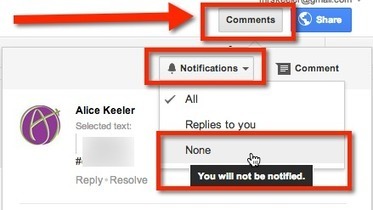
Google Docs: Stop Email Notifications

If you are shared on a Google document with a large group of people you may find the number of email notifications from collaborators inserting comments to be overwhelming. I like my students to receive the email notifications when I give them individual feedback, however, when collaborating with a large group this may be unnecessary.See it on Scoop.it, via TIC & Educación

Continuar leyendo: Google Docs: Stop Email Notifications

Fuente: Tic&Educación
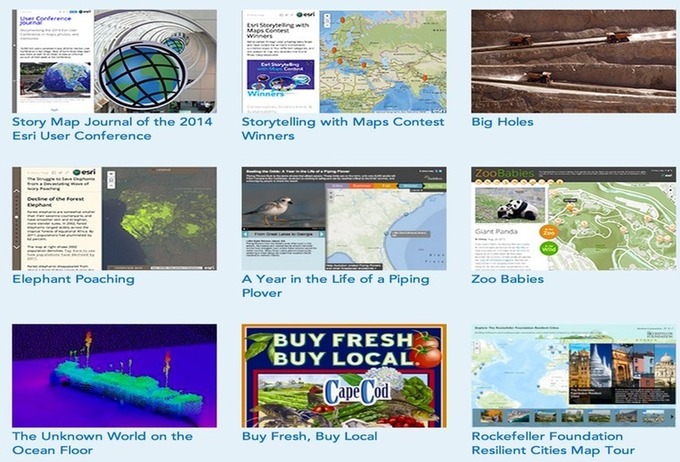
Two Excellent Web Tools to Create Story Maps in Class

The two web tools I m sharing with you today are ideal for creating and sharing mapped stories. Students can use them in class to organize, narrate and present information through the means of geography. Both of these tools are easy to use and are also student friendly. Have a look and share with your students.See it on Scoop.it, via TIC & Educación

Continuar leyendo: Two Excellent Web Tools to Create Story Maps in Class

Fuente: Tic&Educación

Guide to Scoring Rubrics

How do you know if your students have learned something you’ve taught in the classroom? Evaluating the learning process is no simple task. Since learning is a dynamic and complex process, teachers need a diverse set of tools for measuring the progress of his/her students. One of those tools is the scoring rubric.See it on Scoop.it, via TIC & Educación

Continuar leyendo: Guide to Scoring Rubrics

Fuente: Tic&Educación

Freeze Bars in Google Sheets

When using a Google Spreadsheet you will likely want to freeze the first row and maybe the first few columns. What this does for you is allows you to see the header row as you scroll down through the spreadsheet. If you are looking at student data it is likely you would want to freeze the students name so that when you scroll to the right in the spreadsheet you are able to clearly connect …

Continuar leyendo: Freeze Bars in Google Sheets

Fuente: Tic&Educación

6 Uses for Evernote in the Classroom

Evernote is a helpful productivity tool when used effectively on iPad and can play a significant role in a 1:1 iPad classroom. Whether being used in a Math, English, Foreign Language or Art class, by combining the capacity to type, insert images, annotate, and record audio, students can integrate their iPad with Evernote in a number of unique ways. Below are six approaches to using Evernote in the classroom to improve organization, promote reflection, and help students …

Continuar leyendo: 6 Uses for Evernote in the Classroom

Fuente: Tic&Educación
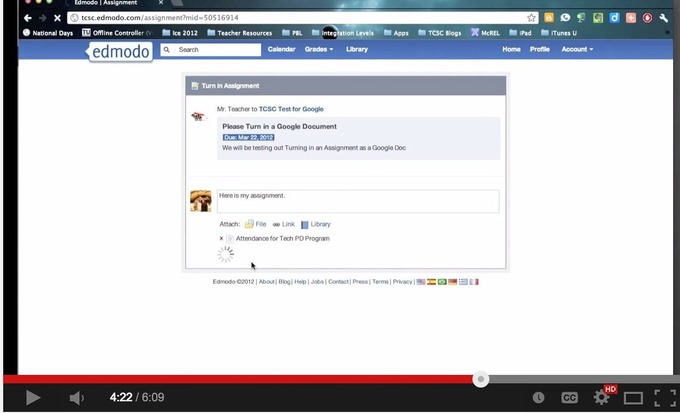
This is How to Use Google Drive with Edmodo to Share Docs and Assignments with Students

During a workshop I facilitated today in university, I was surprised to find out that several teachers did not know that Google Drive is integrated with Edmodo so I thought to write about it here , probably some of you don’t know about it either. The integration of Google Drive with Edmodo allows you to sync the content of your Drive with your Edmodo library so you can easily access and share your docs, files and folders with your Edmodo …

Continuar leyendo: This is How to Use Google Drive with Edmodo to Share Docs and Assignments with Students

Fuente: Tic&Educación

Evernote 101: How to Share Notes Using Evernote

I know, I just blogged about Evernote after ISTE, but it was a short post and there was so much more that I wanted to know! My UltiMaTe BiG QueSTioN: How do I use Evernote with students and teachers at school? My answer…”I don’t know…yet.”, but I am embarking on a journey to figure it out. So, here I go…my first entry on using Evernote.See it on Scoop.it, via TIC & Educación

Continuar leyendo: Evernote 101: How to Share Notes Using Evernote

Fuente: Tic&Educación

A Collection of Interactive Maps

Using interactive maps in the classroom encourages exploration, invites curiosity and promotes spatial thinking. Interactive maps can be used to provide students with background knowledge to launch a unit, or they can be used as a starting point for digging deeper into any concept through research. Interactive maps can be used to explore a wide variety of topics in traditional ways, or they can be used creatively to help students visualize just about anything.See it on Scoop….

Continuar leyendo: A Collection of Interactive Maps

Fuente: Tic&Educación

Excellent Guides and Tutorials to Help Kids Make Engaging Educational Movies

Engaging kids in creative video productions allows them to develop communication skills and enhances their technical know-how. It also gives them an avenue through which they can practice multimodal expressions and present information in numerous ways.This multimodality in communicating information does not only help students understand topics much better and at a deeper level but is also an elemental feature of the 21st century learning.See it on Scoop.it, via TIC & Educación

Continuar leyendo: Excellent Guides and Tutorials to Help Kids Make Engaging Educational Movies

Fuente: Tic&Educación

Comic Poster- What Students Should Know about Creative Commons Licenses

Here is another excellent infographic on the different Creative Commons Licenses. As most of you know, Creative Commons (CC) is a licensing non-profit body that provides content originators with different kinds of licenses that they can grant to the general public to use their work. Instead of “all rights reserved rule” CC works as “some rights reserved rule”. Using CC licenses, authors of original content can specify the conditions, freedoms and limitations for the …

Continuar leyendo: Comic Poster- What Students Should Know about Creative Commons Licenses

Fuente: Tic&Educación

27 Ways To Inspire Innovative Thinking In Students

27 Ways To Inspire Innovative Thinking In StudentsSee it on Scoop.it, via TIC & Educación

Continuar leyendo: 27 Ways To Inspire Innovative Thinking In Students

Fuente: Tic&Educación

The Science of Attention: How To Capture And Hold The Attention of Easily Distracted Students

How long can you reasonably expect your students to pay attention during your lessons? Some psychologists claim the typical student’s attention span is about 10 to 15 minutes long, yet most university classes last 50 to 90 minutes. Students’ attention levels vary widely based on factors like motivation, emotion, enjoyment, and time of day. From incorporating demonstrations or visuals into our lessons to requiring student participation, we do our best to keep students interested and alert. But could we be doing better?See…

Continuar leyendo: The Science of Attention: How To Capture And Hold The Attention of Easily Distracted Students

Fuente: Tic&Educación

The Ultimate Word Wall with ThingLink & Padlet

I am fortunate to be working with an amazing group of educators this summer for the ThingLink Teacher Challenge. This week’s challenge to design an activity to help students Dig Deeper Into Vocabulary, a topic I am very passionate about.See it on Scoop.it, via TIC & Educación

Continuar leyendo: The Ultimate Word Wall with ThingLink & Padlet

Fuente: Tic&Educación

32 Ways to Use Google Apps in Your Classroom

Looking for some ways and tips to integrate Google Apps in your school or classroom? Julia Stiglitz has this wonderful presentation to help you out. Julia provides several examples and links on how to use each of Google products in your class with students. I have gone through this presentation a few times and pulled these notes for you.See it on Scoop.it, via TIC & Educación

Continuar leyendo: 32 Ways to Use Google Apps in Your Classroom

Fuente: Tic&Educación
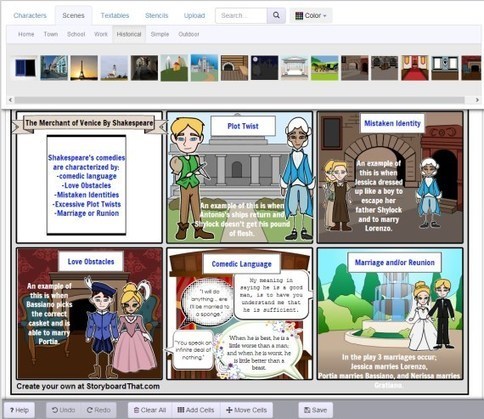
Storyboard That: The World’s Best FREE Online Storyboard Creator

Looking for an amazing, fun, free, and easy to use online storyboard creator? See why students, screenwriters, and businesses love Storyboard That.See it on Scoop.it, via TIC & Educación

Continuar leyendo: Storyboard That: The World’s Best FREE Online Storyboard Creator

Fuente: Tic&Educación
The Beginner’s Guide To Google In The Classroom

Google offers a ton of solutions for students, teachers, and classrooms. Some products are intentionally designed for classrooms, others just happen to work well for that setting as well as many others. The Google Apps For Education and Google Play for Education are two tools built for teachers and students that encompass a ton of different …See it on Scoop.it, via TIC & Educación

Continuar leyendo: The Beginner’s Guide To Google In The Classroom

Fuente: Tic&Educación

4 Important Tips to Improve Students Search on Google Image

Google Image is one of the powerful image search engines online and it is probably one of the first options students head to when searching for images to use in their multimedia projects.Of course, there other several other great platforms for searching for images to use for educational purposes but today I want to focus on Google Image and share with you some overlooked tips that students need to pay heed to when searching for images. Using these …

Continuar leyendo: 4 Important Tips to Improve Students Search on Google Image

Fuente: Tic&Educación

YouTube Playlist Tips

When I am making videos for my online classes I strive to create 30 second video clips. 3 minutes is my upper limit, but I really try not to get anywhere close to that length for a video. Rather than one long video I record for 30 seconds at a time and put the collection of videos into a YouTube playlist. This allows me to name each segment of the video very specifically to allow students to find …

Continuar leyendo: YouTube Playlist Tips

Fuente: Tic&Educación