Artículos con la etiqueta ‘tips’

11 Tips to Use Animations and Videos in Mobile Learning Courses [Infographic]

It is well-known that several media elements like videos and animations help engage the learners effectively in the online learning environment. They can be very useful to explain complex concepts in a simple and easy way. Moreover, they help the learner remember the content for a long period of time.See it on Scoop.it, via TIC & Educación

Continuar leyendo: 11 Tips to Use Animations and Videos in Mobile Learning Courses [Infographic]

Fuente: Tic&Educación

10 Netiquette Tips For Online Discussions

As an online learner, you already know that participating in your eLearning course online discussions contributes to your critical thinking and writing skills’ development. However, there is a netiquette code for online discussions too. In this article, I’ll share the 10 top netiquette tips for participating in online discussions, so that you will be able to make the most of your eLearning experience.See it on Scoop.it, via TIC & Educación

Continuar leyendo: 10 Netiquette Tips For Online Discussions

Fuente: Tic&Educación

10 Google Docs Tips that Take Seconds & Save You Time

2006 was a landmark year in Google’s history. The Oxford English Dictionary accepted “Google” as a verb.Since then we have done quite a lot to make that action the grammar for our online lives. We follow its particular syntax to search for information. We follow the rules ofGmail netiquette. And we read with awe and alarm as Google impacts our future lives.See it on Scoop.it, via TIC & Educación

Continuar leyendo: 10 Google Docs Tips that Take Seconds & Save You Time

Fuente: Tic&Educación
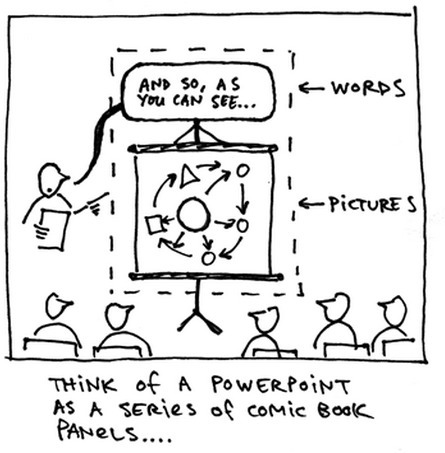
Lo que DEBES hacer y lo que NO para llevar tu presentación de diapositivas a un congreso #TIPS

Cada vez que participamos en un congreso, jornada, curso, o cualquier otro ámbito en el cual haya que presentarse con una apoyatura visual en diapositivas, aprendemos algún detalle sobre TODO LO QUE HAY QUE HACER y TODO LO QUE NO HAY QUE HACER en ese momento. Esta es una lista de tips descontracturados :) basados en la experiencia:See it on Scoop.it, via TIC & Educación

Continuar leyendo: Lo que DEBES hacer y lo que NO para llevar tu presentación de diapositivas a un congreso #TIPS

Fuente: Tic&Educación
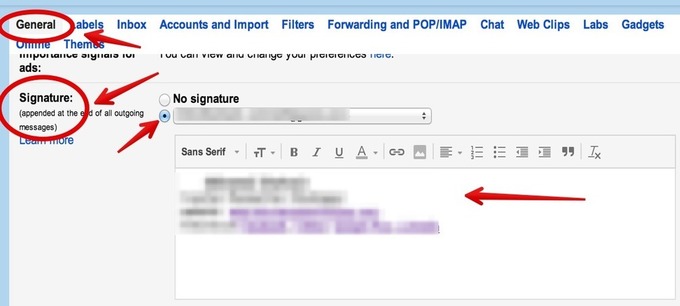
5 Useful Gmail Tips for Teachers

Here are some helpful tips we pulled out from our Gmail Tips archive to share with you today. These tips are meant to help you enhance your productivity and make the best of your gmail experiences. Let us know what you think of them.See it on Scoop.it, via TIC & Educación

Continuar leyendo: 5 Useful Gmail Tips for Teachers

Fuente: Tic&Educación

10 Tips For Effective Problem-Based Learning: The Ultimate Instructional Solution

Problem-based learning (PBL) was first introduced to the field of education in the 1960s by medical education specialist Howard Barrows, who argued that the teaching of medicine at McMaster University in Ontario, Canada should be organized in a way that emulated the reasoning of a skilled practitioner.See it on Scoop.it, via TIC & Educación

Continuar leyendo: 10 Tips For Effective Problem-Based Learning: The Ultimate Instructional Solution

Fuente: Tic&Educación

Google Safety Center – Good Tips for Parents

Google’s Safety Center offers parents good advice on keeping their kids safe online. Much of the information provided in the Safety Center is focused on things like privacy settings, search filters, and Android app management. The information on settings and filters is complemented with advice on talking to kids about responsible online behaviors. That advice comes from organizations including Common Sense Media, iKeep Safe, and OnGuard Online.See it on Scoop.it, via TIC & Educación

Continuar leyendo: Google Safety Center – Good Tips for Parents

Fuente: Tic&Educación
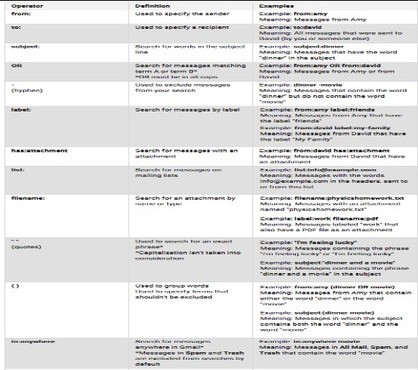
Great Tips on How to Effectively Search Gmail and Google Drive

In this wonderful video Google engineers Liu and Merrified share some interesting tips and insights on how to effectively search your Gmail and Drive.The purpose is to enable you to tap into some hidden gems that will allow you to search for what you need in Gmail or Drive quickly and accurately.See it on Scoop.it, via TIC & Educación

Continuar leyendo: Great Tips on How to Effectively Search Gmail and Google Drive

Fuente: Tic&Educación
10 Tips for Folders in Google Drive

Folders allow you to organize your files in Google Drive. They also allow you to more efficiently share a collection of documents. If you’ve switched to the new Google Drive you can create a folder by clicking on the reddish “NEW” button and choosing folder. The “Create” button provides the same options if you have not switched over.See it on Scoop.it, via TIC & Educación

Continuar leyendo: 10 Tips for Folders in Google Drive

Fuente: Tic&Educación

6 Tips To Engage Passive Learners In eLearning

In this article, I’ll share some tips on how you can create eLearning deliverables that turn even the most passive learners into engaged, excited, and motivated ones who achieve profound change thanks to your eLearning course. Read the following tips to engage passive learners in eLearning converting your eLearning course into a memorable experience.See it on Scoop.it, via TIC & Educación

Continuar leyendo: 6 Tips To Engage Passive Learners In eLearning

Fuente: Tic&Educación

Gamification vs Game-Based eLearning: Can You Tell The Difference?

The terms “gamification” and “game-based eLearning” are sometimes used interchangeably. However, there are distinct differences between the two that all eLearning professionals should be aware of. In this article, I’ll compare and contrast gamification vs game-based eLearning and I’ll give you some useful tips on how to design an effective instructional strategy for each.See it on Scoop.it, via TIC & Educación

Continuar leyendo: Gamification vs Game-Based eLearning: Can You Tell The Difference?

Fuente: Tic&Educación

Editable Sample Rubric

This easy-to-use Microsoft Word rubric template — created by Cait Camarata, Edutopia’s visual designer — can be modified to suit your own needs. It is also available in Google Docs format. Read about some of the elements of well-designed rubrics in the associated post: “4 Easy Tips and Tricks for Creating Visually Engaging Rubrics.”See it on Scoop.it, via TIC & Educación

Continuar leyendo: Editable Sample Rubric

Fuente: Tic&Educación
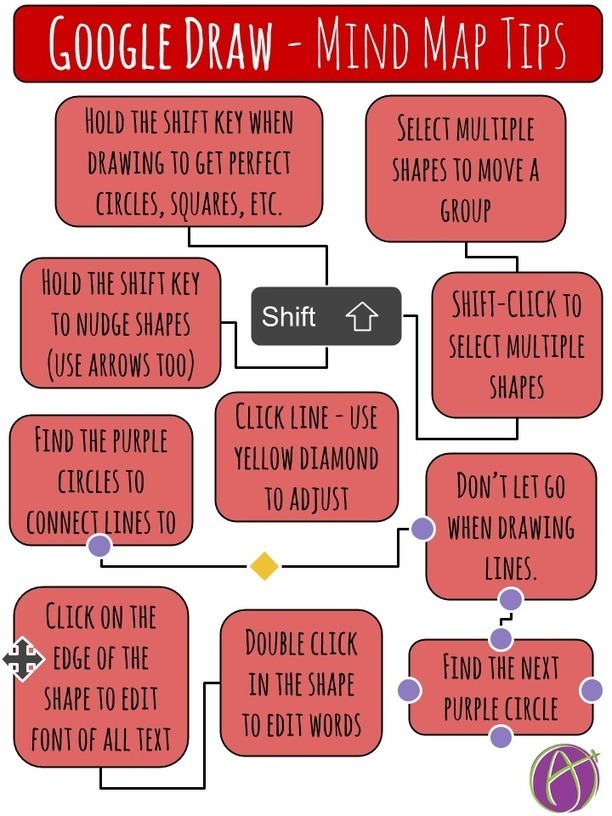
Google Draw: Tips for Making Mind Maps

@learnwithmsm uses Google Drawings to make Mind Maps with her 2nd and 3rd graders. The drawing above provides a few tips for students to help them create Mind Maps.Link to Google Drawing: http://goo.gl/x2yqxVSee it on Scoop.it, via TIC & Educación

Continuar leyendo: Google Draw: Tips for Making Mind Maps

Fuente: Tic&Educación

5 Email Etiquette Tips for Students – Some for Teachers Too

One of my pet peeves is receiving an email that from someone that just launches into a request without stopping to address me by name. For years I have told students that I won’t reply to emails if they don’t write “Hi Mr. Byrne” or something similar to start their emails. Many of my colleagues have similar policies, I’m sure that many of you do too. Using your recipient’s name is one of five good email etiquette tips for students …

Continuar leyendo: 5 Email Etiquette Tips for Students – Some for Teachers Too

Fuente: Tic&Educación

5 Ways to Make Professional Looking Google Documents

The Gooru recently posted “4 Tips for Making Professional Looking Google Documents.” Here are a few more tips for using Google Docs for professional looking documents.See it on Scoop.it, via TIC & Educación

Continuar leyendo: 5 Ways to Make Professional Looking Google Documents

Fuente: Tic&Educación

Visual Story Telling Presentation Design Tips

Design tips for visual storytelling. Learn key design strategies for creating visual presentations.See it on Scoop.it, via TIC & Educación

Continuar leyendo: Visual Story Telling Presentation Design Tips

Fuente: Tic&Educación

20 Top Pinterest Tips

Pinterest is different from other sites. When you pin something, people will be looking at and repinning it years later. Pinterest may be the secret powerhouse of educational sharing. Here are 20 power tips that you can use in many areas of schools and your classroom.See it on Scoop.it, via TIC & Educación

Continuar leyendo: 20 Top Pinterest Tips

Fuente: Tic&Educación

15 Gmail Tips Every Teacher Should Know About

Over the past few months Gmail has witnessed the addition of a lot of interesting features and functionalities that enhanced its overall performance. Gmail also provides several hidden gems to users who are willing to dig a bit deeper and take their email experience to the next level. To help you make the best of Gmail, we have gone through Gmail help documentation and handpicked these wonderful tips for you. These are simple hacks that you can use on …

Continuar leyendo: 15 Gmail Tips Every Teacher Should Know About

Fuente: Tic&Educación

3 Important Google Drive Tips for Teachers

For those of you who haven’t seen them yet, Google for Education has recently added some interesting posts covering a bunch of handy features to use on your Google Drive. Here are the three most interesting updates I want to bring to your attentionSee it on Scoop.it, via TIC & Educación

Continuar leyendo: 3 Important Google Drive Tips for Teachers

Fuente: Tic&Educación