Artículos con la etiqueta ‘social media’

A New Free Online Collage Maker Tool for Teachers

FotoJet is a free online collage maker that helps us create beautiful collages, posters, social media works, photo cards, and more without the hassles of downloading and registering. It has a very clean and straightforward interface. Using it is as easy as moving and dragging your mouse.See it on Scoop.it, via TIC & Educación

Continuar leyendo: A New Free Online Collage Maker Tool for Teachers

Fuente: Tic&Educación

Lo que debes saber sobre Hashtags y Redes Sociales (infografía)

Los hashtags son unos excelentes aliados a la hora de llevar a cabo estrategias de Social Media, nos ayudan a organizar los contenidos y son un elemento fácil de monitorizar para medir el impacto de las campañas. Son muchas las redes sociales que permiten el empleo de hashtags, no obstante su uso no debe ser igual en todas ellas.La presente infografía, realizada por el sitio Difraxion, lleva el título de “Al rescate…

Continuar leyendo: Lo que debes saber sobre Hashtags y Redes Sociales (infografía)

Fuente: Tic&Educación

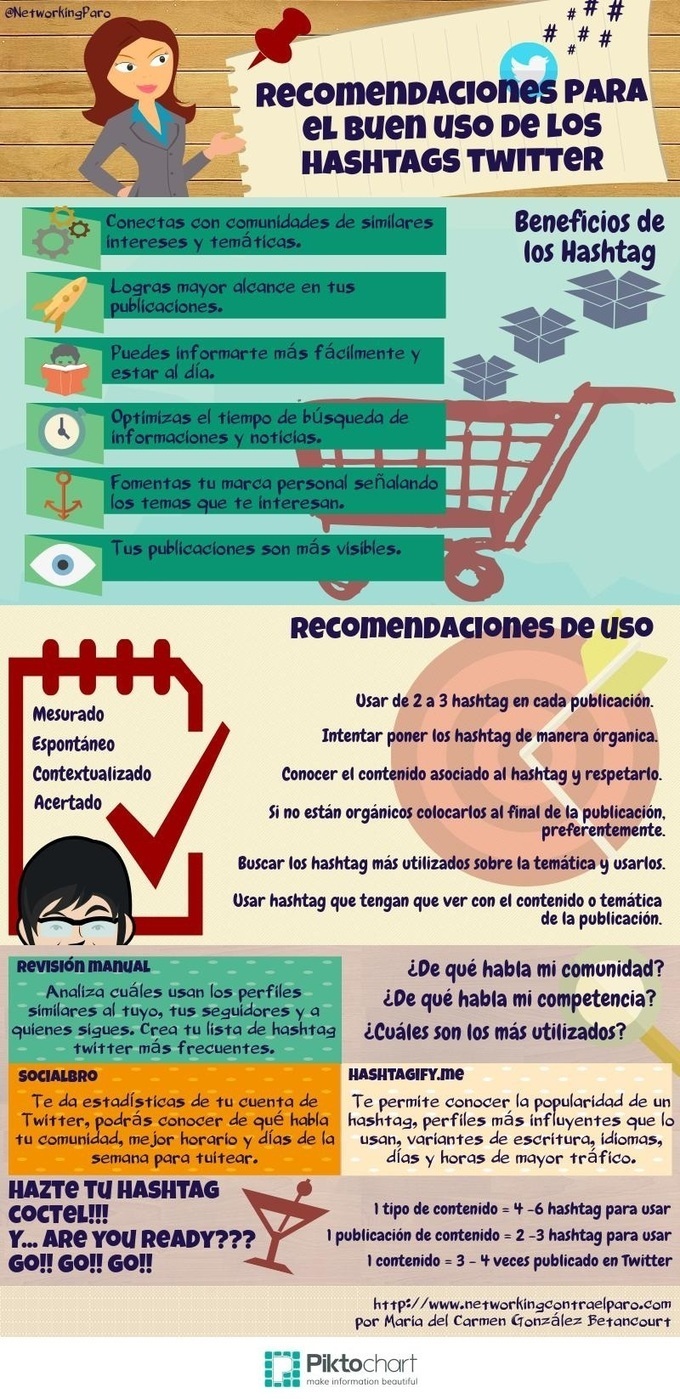
Consejos para hacer buen uso de los hashtags en Twitter (infografía)

Si trabajáis en la red y os interesa el Social Media Marketing ya sabéis la importancia que puede tener el uso correcto de los hashtags, particularmente en Twitter que fue su principal precursora. Por eso nunca terminamos de aprender trucos y consejos que nos puedan ayudar a un mejor aprovechamiento de los hashtags en Twitter.See it on Scoop.it, via TIC & Educación

Continuar leyendo: Consejos para hacer buen uso de los hashtags en Twitter (infografía)

Fuente: Tic&Educación

5 Benefits of Using a Hashtag for Events

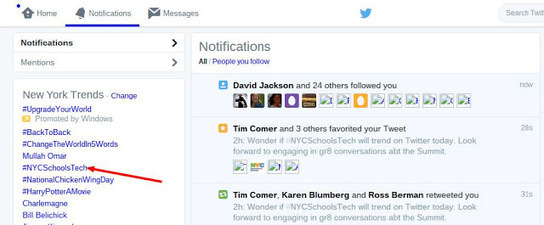
At our recent NYC Schools Technology Summit, many participants were using our hashtag #NYCSchoolsTech in Twitter, Instagram, and other social media sites for the first time. Doing so enabled them to discover the following benefits of placing a simple “#” before a carefully chosen descriptor of “NYCSchoolsTech.” Being in touch with the buzz that was being generated via the attendees.Enabling attendees to have conversation with a network of people who shared interests about what they were seeing and …

Continuar leyendo: 5 Benefits of Using a Hashtag for Events

Fuente: Tic&Educación

5 ideas to inspire students to use social media for good

High School Musical” star Monique Coleman is a youth empowerment advocate who recently provided advice about using social media to do good. Below is the advice she shared on her site http://gimmemo.com followed by her video where you can hear her for yourself sharing these ideas. See it on Scoop.it, via TIC & Educación

Continuar leyendo: 5 ideas to inspire students to use social media for good

Fuente: Tic&Educación

8 Pasos Para Hacer Crecer Tu Comunidad En Twitter

No existen fórmulas mágicas en las estrategias Social Media, pero es mucho más fácil afrontar un proyecto digital con éxito cuando tienes claros los cimientos sobre los que vas a construirlo. En ocasiones muchas agencias y empresas hacen lo que define muy bien la frase “empezar la casa por el tejado”.See it on Scoop.it, via TIC & Educación

Continuar leyendo: 8 Pasos Para Hacer Crecer Tu Comunidad En Twitter

Fuente: Tic&Educación

Guía avanzada de Facebook en una presentación de 120 páginas

Y todos estos aspectos son los que se tratan en esta Guía avanzada de Facebook, un manual en formato de presentación compuesta por 120 páginas o diapositivas.La guía es un trabajo compartido por Unai Benito en la plataforma Slideshare, está destinada a todas las personas que quieran profundizar en Facebook para beneficiarse de su potencial para el Social Media Marketing.See it on Scoop.it, via TIC & Educación

Continuar leyendo: Guía avanzada de Facebook en una presentación de 120 páginas

Fuente: Tic&Educación

Speaker Deck- A Good Presentation Tool for Teachers

Speaker Deck is an excellent web tool that allows you to easily share your presentations online. You simply upload your slides as PDF and Speaker Deck turns them into a beautiful online experience. You can then share your generated presentation with others using different options including a unique URL link, social media websites such a Facebook and Twitter, or use the embed code to embed presentations in your website.See it on Scoop.it, via TIC & Educación

Continuar leyendo: Speaker Deck- A Good Presentation Tool for Teachers

Fuente: Tic&Educación

How to Create Image Collages and More on Canva

Canva is one of my favorite tools for creating image collages, slides, social media graphics, and infographics. The lesson plan library that Canva offers is an excellent place to find ideas for using visuals in your classroom. The one complaint that I hear about Canva, I heard it this week during a workshop I was leading, is that there are some frustrating quirks to using it for the first time. I made the video that is embedded below …

Continuar leyendo: How to Create Image Collages and More on Canva

Fuente: Tic&Educación

Sobre la content curation y su importancia

Vía este artículo de Om Malik en GigaOM, “What is curation?“ llego a este vídeo de Percolate, una herramienta de social media marketing muy interesante que ayuda a las marcas a consumir, filtrar y publicar contenido interesante para sus seguidores. En el vídeo, preguntan a varios “content curators” qué es lo que les lleva a trabajar como lo hacen, a compartir información que consideran relevante, y a hacerlo de una…

Continuar leyendo: Sobre la content curation y su importancia

Fuente: Tic&Educación

Two More Tools for Creating Educational Timelines in Class

After yesterday’s post we received a couple of requests from our followers on social media suggesting the inclusion of Hstry and MyHistro to the list. These are two timeline creation tools we have already covered in separate posts in the past. As teachers, you can use these web applications with students to create educational timelines showcasing the development of a given phenomenon or to chronicle the major historical events over a stretch of time or provide a…

Continuar leyendo: Two More Tools for Creating Educational Timelines in Class

Fuente: Tic&Educación

Using Twitter For eLearning: 8 Pros and 6 Cons To Consider

Using social media as eLearning platforms is a well known practice for most eLearning professionals, nowadays, as social media have become almost everyone’s second nature and they can offer opportunities for sharing eLearning techniques, promoting information and exchanging opinions, views and comments. But, should you incorporate Twitter into your eLearning strategy? In this article, I will reveal 8 pros and 6 cons to consider when using Twitter for eLearning.See it on Scoop.it, via TIC & Educación

Continuar leyendo: Using Twitter For eLearning: 8 Pros and 6 Cons To Consider

Fuente: Tic&Educación

6 Creative Ways to Use Skype in the Classroom

The old adage that “you get what you pay for” seems increasingly outdated in the age of free technologies that provide real value. Like Google’s free tools and all the main social media platforms, Skype is one more free and infinitely useful tool that educators can add to their toolbox.See it on Scoop.it, via TIC & Educación

Continuar leyendo: 6 Creative Ways to Use Skype in the Classroom

Fuente: Tic&Educación

Why, and how, schools should be using Instagram

So while Facebook is dead and buried for the cool kids, and the likes of Snapchat don’t really work for an institution, Instagram still has kudos as well as scale. If you want to be reasonably sure that the people you want are on board, then Instagram it is.So should a school use it? Should a school start to use the fastest growing, and already one of the biggest, social media platforms in the world…

Continuar leyendo: Why, and how, schools should be using Instagram

Fuente: Tic&Educación

Every Teacher’s Must Have Guide to Facebook

Want to connect with your students in and out of the classroom? Consider bringing Facebook into your class as a collaborative tool. We all know that most kids, or at least those in the pre-teen and up category, are locked into many forms of social media. Instead of fighting it, why not meet them where they are, and use the benefits of Facebook to communicate and increase involvement?See it on Scoop.it, via TIC & Educación

Continuar leyendo: Every Teacher’s Must Have Guide to Facebook

Fuente: Tic&Educación
Content Curation: función docente imprescindible

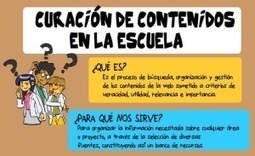
Content curation: que significa este concepto? As súas orixes etimolóxicas situanse nun artigo publicado por Rohit Bhargava, do sector do marketing, no 2009: Manifesto for the content curator: The next big social media job of the future. Ante a cantidade incesante de información (denominado infoxicación na actualidade) son precisos determinados profesionais (content curator) que busquen, filtren e compartan contidos con criterios de calidade.See it on Scoop.it, via TIC & Educación

Continuar leyendo: Content Curation: función docente imprescindible

Fuente: Tic&Educación

Cómo crear y mantener tu propia agenda de tuits programados con TweetDeck

Hace unos días, ante la escasez de soluciones que nos permiten programar tuits para todos aquellos que no quieran usar herramientas profesionales de social media, os contamos cómo utilizar una receta de IFTTT combinada para lograrlo. Buena técnica para los que quieren tener un calendario visible con esos tuits, pero ¿hay una forma más sencilla de conseguirlo?La respuesta es sí, gracias a TweetDeck. Este cliente oficial de Twitter está quedando …

Continuar leyendo: Cómo crear y mantener tu propia agenda de tuits programados con TweetDeck

Fuente: Tic&Educación

What ThingLink can do for Education by jkern

Featured this amazing image on the ThingLink Blog here thinglinkblog.com You Consider putting your name and social media contact on tags on this image for proper credit.See it on Scoop.it, via TIC & Educación

Continuar leyendo: What ThingLink can do for Education by jkern

Fuente: Tic&Educación

¿Qué haces publicando en Twitter con tu localización? Cómo eliminarla de todos tus tuits

Una de las peculiaridades de Twitter como red social es, si la usamos muy frecuentemente, que accedemos a ella mediante varios clientes: la web, la aplicación para iPhone que puede ser la oficial o una de terceros, la versión para iPad, alguna herramienta de social media… y surge el problema de que cada cliente tiene su configuración.See it on Scoop.it, via TIC & Educación

Continuar leyendo: ¿Qué haces publicando en Twitter con tu localización? Cómo eliminarla de todos tus tuits

Fuente: Tic&Educación

Cómo programar un tuit sin aplicaciones avanzadas de social media

Pero todo esto, lógicamente, está orientado a profesionales del social media. ¿Pero y si simplemente queremos experimentar, o querer informar de algún evento puntualmente sin que haga falta ser community manager? Ningún problema: tenemos un modo con el que poder programar un tuit con una simple receta de IFTTT, que nos permitirá incluso tener una agenda de mensajes listos para publicar.See it on Scoop.it, via TIC & Educación

Continuar leyendo: Cómo programar un tuit sin aplicaciones avanzadas de social media

Fuente: Tic&Educación