Artículos con la etiqueta ‘students’

How to Use Skitch to Blur Faces and More

On Monday I wrote a short post about using Skitch to protect students’ privacy when sharing pictures of school events. A few people contacted me through the FreeTech4Teachers Facebook page for more information about how Skitch works. To answer those questions I created the video that you see embedded below.See it on Scoop.it, via TIC & Educación

Continuar leyendo: How to Use Skitch to Blur Faces and More

Fuente: Tic&Educación

Three Free Tools for Creating Stopmotion and Timelapse Videos

Creating stopmotion and timelapse videos can be a good way for students to tell a story that they have developed. Stopmtion and timelapse videos can also be helpful when teachers are trying to help students see how a lengthy process like osmosis works. While good stopmotion and timelapse videos can take a long time to create, there are some tools that can make the process a little easier. Here are three stopmtion video creation tools that are worth …

Continuar leyendo: Three Free Tools for Creating Stopmotion and Timelapse Videos

Fuente: Tic&Educación

5 Free Tools To Make Alternative School Presentations

In this article, I will share with you 5 Free Tools to Make Alternative School Presentations. Explore each one to find which is the ideal for you and your students!See it on Scoop.it, via TIC & Educación

Continuar leyendo: 5 Free Tools To Make Alternative School Presentations

Fuente: Tic&Educación

Google Forms: Notification Rules

Depending on the data you are collecting from students you may want to receive an email when the form is submitted. At the suggestion of Ramsey Musallam I have included an anonymous honest feedback form with each lesson. Students do not always fill out the form each lesson, thus necessitating that I receive a notification when the form is submitted.See it on Scoop.it, via TIC & Educación

Continuar leyendo: Google Forms: Notification Rules

Fuente: Tic&Educación

12 Ways Teachers Can use Google Classroom

Google Classroom which is only six months old has managed to host over 30 million assignments turned in by teachers and students. This is a big sign that the tool is being widely endorsed within the education community particularly in the States. With this increasing popularity of Google Classroom, Google recently released some new updates to enhance its performance and make it more mobile friendly. TheSee it on Scoop.it, via TIC & Educación

Continuar leyendo: 12 Ways Teachers Can use Google Classroom

Fuente: Tic&Educación
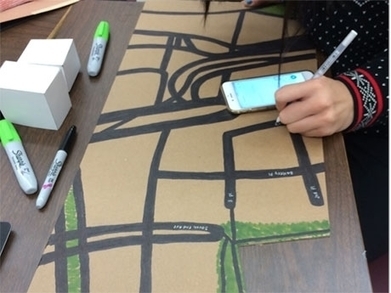
Creating an Authentic Maker Education Rubric

While many teachers are excited about the maker movement and may even be creating projects for their classrooms, assessment can be puzzling even to veteran classroom teachers. How can teachers prove that deep, rich learning is occurring through making? How do we justify a grade to students and parents alike, especially to the student who “just isn’t good at art”? By crafting a three-part rubric that assesses process, understanding, and product, teachers can …

Continuar leyendo: Creating an Authentic Maker Education Rubric

Fuente: Tic&Educación
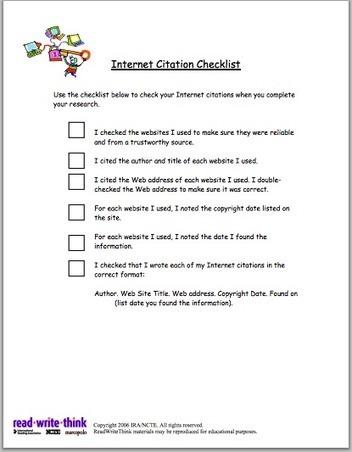
Internet Citation Checklist for Students

In an earliest post I shared Internet Citation Organizer, which is a tool from Read Write Think to help students record citation information to use when citing online sources. In this post, I am sharing another useful graphic organizer from Read Write Think that students can use with the previous tool to properly cite Internet sources.See it on Scoop.it, via TIC & Educación

Continuar leyendo: Internet Citation Checklist for Students

Fuente: Tic&Educación

Video – How to Create Custom Columns on Padlet Walls

Last week I published a post about creating custom columns on Padlet walls. Creating custom columns allows you to use Padlet as a place for students to collaboratively create KWL charts and other graphic organizers. In the video embedded below I provide a demonstration of how I use Google Documents to build custom columns for Padlet walls.See it on Scoop.it, via TIC & Educación

Continuar leyendo: Video – How to Create Custom Columns on Padlet Walls

Fuente: Tic&Educación

How to Use Social Media as a Learning Tool in the Classroom

Social media is an ingrained part of today’s society. Our students are constantly on Instagram, Facebook, Twitter, and likely many sites we’re not hip enough to know about, and by reading this blog, you’re interacting with social media at this very moment. If you want to bring the “real world” into the classroom, consider integrating social media into your lessons.See it on Scoop.it, via TIC & Educación

Continuar leyendo: How to Use Social Media as a Learning Tool in the Classroom

Fuente: Tic&Educación

Using Timelines as Digital Portfolios and Reflections on Learning

Building timeline can be a good way for students organize the things they have learned created in the course of a school year. Creating a multimedia timeline is a good method of displaying the things that students have created in the course of the school year.See it on Scoop.it, via TIC & Educación

Continuar leyendo: Using Timelines as Digital Portfolios and Reflections on Learning

Fuente: Tic&Educación
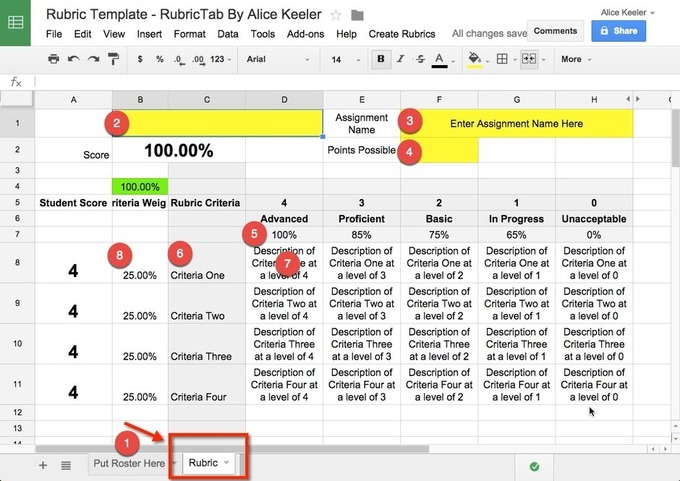
Google Sheets: Rubric Template

Most teachers need to use a rubric at some point. This template is a 4 point rubric that will help you to score student work against the rubric. Make a copy of the template. Copy and paste your students names onto the roster tab and enter in your rubric information. Run the RubricTab script in the spreadsheetSee it on Scoop.it, via TIC & Educación

Continuar leyendo: Google Sheets: Rubric Template

Fuente: Tic&Educación

How to Add Custom Columns to Padlet Walls

I’ve written about Padlet a lot over the years because of its flexibility to fit into a lot of classroom situations. One of the ways that you can use Padlet is to have students collaboratively create multimedia KWL (Know, Want, Learn) charts. To provide students with guidance on where to place their notes, I use a custom background on Padlet. The background is a just a screenshot of a three column page that I make in Google Documents (any…

Continuar leyendo: How to Add Custom Columns to Padlet Walls

Fuente: Tic&Educación
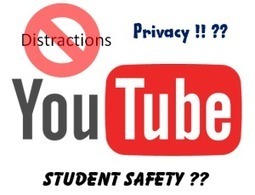
5 Ways to Share YouTube Videos Safely and Privately (Without the Distractions)

Do you want to be able to use YouTube in your class, but are concerned about exposing students to the distractions that surround it? Worse yet, inappropriate content may be displayed, which is a huge concern for younger students in particular.Well I am here to provide a few approaches to solving that problem. You can use YouTube to host and deliver videos safely, without the distractions.See it on Scoop.it, via TIC & Educación

Continuar leyendo: 5 Ways to Share YouTube Videos Safely and Privately (Without the Distractions)

Fuente: Tic&Educación

4 Benefits To Using Badges In Online Learning

There are several benefits to using badges in an online class. Among these are greater autonomy for students, greater levels of feedback, and a variety of assignments. Students also enjoy the ability to try again if they don’t succeed at first and the badge graphics they receive once they earn the badge.See it on Scoop.it, via TIC & Educación

Continuar leyendo: 4 Benefits To Using Badges In Online Learning

Fuente: Tic&Educación

The biggest hurdle to flipping your class

When teachers flip their classes, I believe they must ask one key question: What is the best use of class time? Is it information dissemination, or is it something else? I argue that we need to get away from direct instruction to the whole group and instead use class time for richer and more meaningful activities and interactions.Why is this a big hurdle? I think it is because many of us have been doing school the same way …

Continuar leyendo: The biggest hurdle to flipping your class

Fuente: Recull Diari

Here Is How to Create Digital Quizzes and Surveys Using Kahoot

Kahoot is another great student response system that teachers can use to create and deliver quizzes and surveys to students. Kahoot provides a learning environment that is ideal for engaging students for it incorporates the precepts of both game-based learning and inquiry-based learning. Kahoot allows teachers to create quizzes and surreys that include a wide variety of multimedia elements such as videos, pictures and text.See it on Scoop.it, via TIC & Educación

Continuar leyendo: Here Is How to Create Digital Quizzes and Surveys Using Kahoot

Fuente: Tic&Educación

Great Digital Storytelling Tools and Apps for Your Students

Learning how to read unlocks a wealth of important fundamental skills. If you are on holiday right now, this can be a great time to read to or give your kids a good story. Or, to indulge in an engaging interactive digital storybook!See it on Scoop.it, via TIC & Educación

Continuar leyendo: Great Digital Storytelling Tools and Apps for Your Students

Fuente: Tic&Educación

The 5 Best TED Talks for Teachers

TED talks are invaluable resources for teachers professional development. They cover a wide variety of education related topics and provide a very good source of inspiration for teachers and students. Throughout the year we have been sharing with you some interesting talks from renowned speakers and educators and today we have had a look back at those talks and picked out 5 of the most popular talks within the education community.See it on Scoop.it, via TIC &

Continuar leyendo: The 5 Best TED Talks for Teachers

Fuente: Tic&Educación

52 Of The Best Apps For Your Classroom In 2015

What are the best apps for your classroom? The best little bits of software to use tomorrow, in your school, to make your classroom go?This is, strangely, not a frequent topic for us. We are more interested in helping you push your classroom towards something unrecognizable–something that reflects the extraordinary change the world has seen but many public schools have somehow resisted. Something that centers students, helps them learn what’s worth understanding, and then equips…

Continuar leyendo: 52 Of The Best Apps For Your Classroom In 2015

Fuente: Tic&Educación

How to Enable Collaboration on Thinglink Interactive Images

Last week I received an email from a reader who was looking for a way to have her students collaborate on a multimedia collage. My immediate suggestion was to try Thinglink. She wasn’t aware that Thinglink allows students to collaborate on the creation of interactive images. I made a short video to help her and others who haven’t tried Thinglink’s collaboration option. The video is embedded below.See it on Scoop.it, via TIC & Educación

Continuar leyendo: How to Enable Collaboration on Thinglink Interactive Images

Fuente: Tic&Educación