Artículos con la etiqueta ‘teachers’

5 Powerful Questions Teachers Can Ask Students

My first year teaching a literacy coach came to observe my classroom. After the students left, she commented on how I asked the whole class a question, would wait just a few seconds, and then answer iSee it on Scoop.it, via Aprender y educar

Continuar leyendo: 5 Powerful Questions Teachers Can Ask Students

Fuente: Aprender y Educar

Student Blogging: Creating a Rubric

by Jennifer Isgitt “I’m ready to assess my students’ blogs from the first semester. Does anyone else feel like the first time you assess any new assignment that you’re just trudging through murky molasses? I’m so slow at the assessment piece right now.”I’ve been looking around at student blogging rubrics as I try to decide which components a) I’ve actually taught and b) seem to represent my objectives for blogging…

Continuar leyendo: Student Blogging: Creating a Rubric

Fuente: Tic&Educación

The Future Of Games In Education

gamifGamification is a trend that doesn’t seem to be going away any time soon. Incorporating game play elements into your classroom can help to create a dynamic, interactive environment that will help get and keep your students engaged in the material and excited to learn. It sounds great, right? But every trend will see a fizzle, and this one will inevitably see that too, right? Well, maybe not. Gamification has a number of attributes that make it a …

Continuar leyendo: The Future Of Games In Education

Fuente: Tic&Educación

How To Start Using Augmented Reality In The Classroom

Augmented Reality (AR) allows teachers and students to extend the physical world with a virtual overlay. Whether you have iPad, Android, or a smartphone, scanning a trigger in the physical world with an AR app allows a new layer of information to appear. This information could be a link to a web site, a video, …See it on Scoop.it, via TIC & Educación

Continuar leyendo: How To Start Using Augmented Reality In The Classroom

Fuente: Tic&Educación

The 7 habits of highly effective teachers who use technology

We’ve all heard about Stephen Covey’s 7 Habits of Highly Effective People. Some teachers out there may have heard of the 7 Habits of Highly Effective Teachers. Below are our 7 habits of highly effective teachers who use technology:1) They always start with the why. Technology for technology’s sake is dangerous. Highly effective teachers who use technology always have a reason for using new technology tools. Whether it saves them time, improves learning outcomes, or helps …

Continuar leyendo: The 7 habits of highly effective teachers who use technology

Fuente: Educación y Ecología

10 tools for Student-Centered Creative expression

In my last article, I discussed the inherent benefits of using digital images in the classroom, including strategies in which teachers can use them to promote student thought and performance.With technological revolution infiltrating classrooms across the country, teachers must be on top of their game when faced with students whose attention spans are limited to the length of a twitter update or Instagram post.Fortunately for those beleaguered teachers, hope is not lost. There happens to be …

Continuar leyendo: 10 tools for Student-Centered Creative expression

Fuente: Educación y Ecología

Two Handy Blogging Rubrics for Teachers to Use with Their Students

For students to benefit from the educational potential of blogging, teachers need to state clearly the objectives behind integrating blogs in classroom learning. They should also monitor and encourage students to post and interact with what their peers share through leaving comments. To this end , I am sharing with you rubrics to help you better integrate blogging as an academic tool within your instruction.See it on Scoop.it, via TIC & Educación

Continuar leyendo: Two Handy Blogging Rubrics for Teachers to Use with Their Students

Fuente: Tic&Educación
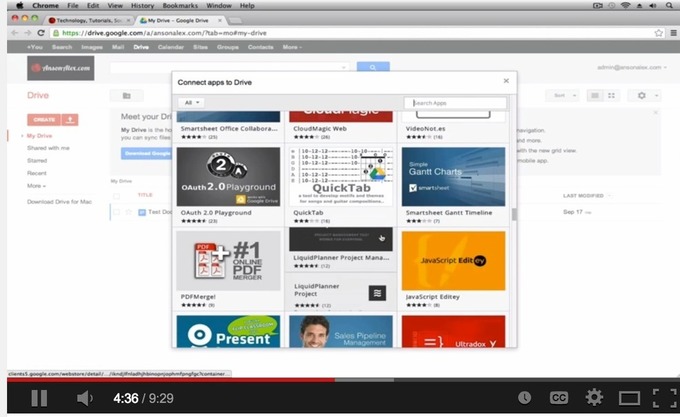
5 Great Google Drive Video Tutorials for Teachers

Today I am sharing with you a slew of interesting Google Drive video tutorials that are created by Anson Alexander. I came across these tutorials while I was browsing through this wonderful site called Working at The Edge. I thought about tweeting this resource without having to post it here but I know 15 thousands of email subscribers to this blog will probably miss them.See it on Scoop.it, via TIC & Educación

Continuar leyendo: 5 Great Google Drive Video Tutorials for Teachers

Fuente: Tic&Educación

10 Excellent Social Bookmarking Tools for Teachers

Below are some of the best social bookmarking websites I would recommend to teachers and students. Have a look and let us know what you think of them on our Facebook page.See it on Scoop.it, via TIC & Educación

Continuar leyendo: 10 Excellent Social Bookmarking Tools for Teachers

Fuente: Tic&Educación

10 of The Best Bibliography and Citation Tools for Teachers and Student Researchers

There are actually a wide range of free web tools that makes it easy for students to generate citations and in different style formats, however, the ones below are the tools I have myself tested and therefor highly recommend for you. I invite you to have a look and share with your colleagues.See it on Scoop.it, via TIC & Educación

Continuar leyendo: 10 of The Best Bibliography and Citation Tools for Teachers and Student Researchers

Fuente: Tic&Educación

10 Tips For Teachers To Connect With Parents Via Social Media

10 Tips For Teachers To Connect With Parents Via Social MediaSee it on Scoop.it, via TIC & Educación

Continuar leyendo: 10 Tips For Teachers To Connect With Parents Via Social Media

Fuente: Tic&Educación

2 Must Have Evernote Tools for Teachers

Yesterday, somebody messaged me on the Facebook page of this bog asking me about my favourite Evernote tools. So I thought why not compose a post about it and share with everybody else. Below are the 2 of my favourite tools I use with my Evernote and which I highly recommend for any Evernote user.Gumersindo Fernández’s insight:1- Evernote Web Clipper2- Evernote ClearlySee it on Scoop.it, via TIC & Educación

Continuar leyendo: 2 Must Have Evernote Tools for Teachers

Fuente: Tic&Educación
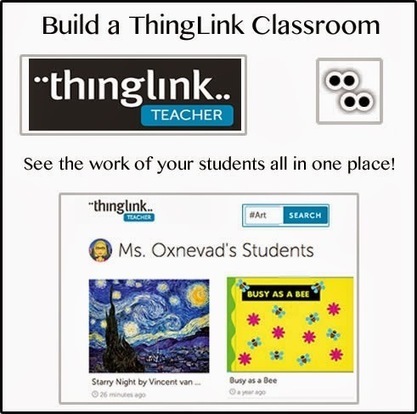
Build Your ThingLink Classroom

ThingLink is working hard to pack teacher accounts full of useful features for building and managing the ThingLink Classroom. I am excited to be guest blogging here in February and March to demonstrate great ways to use the new features. Let’s start from the beginning by taking a look at how teachers can create a ThingLink Classroom and add students.See it on Scoop.it, via TIC & Educación

Continuar leyendo: Build Your ThingLink Classroom

Fuente: Tic&Educación
EDpuzzle: Make any video of your lessons

EdPuzzle makes video delivery an interactive experience. Teachers can build in questions for students to answer and can track the amount of times a student watched a section before getting the question correct.See it on Scoop.it, via Recull diari

Continuar leyendo: EDpuzzle: Make any video of your lessons

Fuente: Recull Diari

10 apps para aprender poesía

En el marco de la lengua y la literatura, posiblemente uno de los aspectos más complejos de enseñar es la poesía. Quizá la estructura, la rima y las sílabas de los versos no, pero el despertar en los alumnos el sentimiento, las emociones y el significado que transmiten unos versos es una tarea que, sin […]

Continuar leyendo: 10 apps para aprender poesía

Fuente: Ididactic.com

5 Important Gmail Tips for Teachers

Google has recently rolled out a slew of new features for Gmail. You can now send direct emails to your Google Plus contacts right from your Gmail and even without knowing their email addresses. Another new feature you might have noticed in your Gmail is the tabbed interface which breaks the Gmail inbox into sections like “Primary”,”Social”, and “Promotions”. However, today I want to share with you some interesting tips from Google Guru on how to make the …

Continuar leyendo: 5 Important Gmail Tips for Teachers

Fuente: Tic&Educación
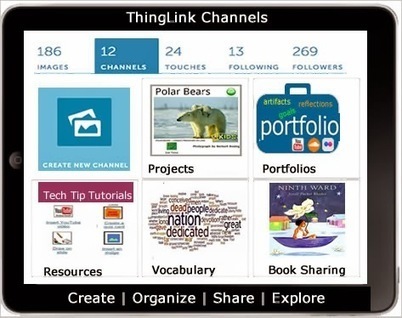
Create Interactive Albums with ThingLink Channels

Now teachers and students can create collections of work within the safety of their own ThingLink EDU classroom with an exciting new feature known as Channels. ThingLink Channels provide users with the ability to organize images into embeddable interactive albums with the click of a button. Teachers and students have the flexibility to build Channels that are connected to learning goals and compliment classroom routines. Channels are a fantastic addition to ThingLink EDU, with many opportunities for …

Continuar leyendo: Create Interactive Albums with ThingLink Channels

Fuente: Tic&Educación

6 Powerful Tools Teachers And Students Should Try Out

There are loads of powerful tools and apps out there worth trying. Here are some of the absolute best.See it on Scoop.it, via TIC & Educación

Continuar leyendo: 6 Powerful Tools Teachers And Students Should Try Out

Fuente: Tic&Educación

Free Technology for Teachers: Mapfaire Offers an Easy Way to Make Online Maps

“Mapfaire is a free tool for quickly creating maps that contain simple placemarks. Using Mapfaire you can create a custom map that highlights places you specify.”See it on Scoop.it, via Educacion, ecologia y TIC

Continuar leyendo: Free Technology for Teachers: Mapfaire Offers an Easy Way to Make Online Maps

Fuente: Educación y Ecología