Archivo de la Categoría ‘Thinglink for video’

Embed a Google Form in a ThingLink Video

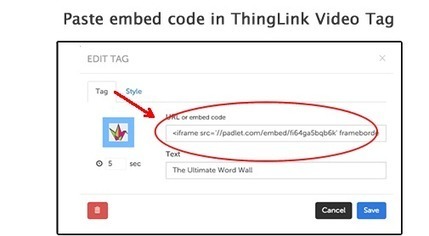
This week, participants in the ThingLink Teacher Challenge were encouraged to Engage Students with ThingLink for Video. The goal of this challenge is to add a layer of resources and interactivity to any video to design a customized student driven learning experience. A great tool for customizing an educational video is the Google Form. This handy tool can be embedded right inside of a ThingLink Video tag and displayed live within the video. See it on Scoop.it, via …

Continuar leyendo: Embed a Google Form in a ThingLink Video

Fuente: Tic&Educación

5 Interactive Tools to Embed in ThingLink Video

In the final week of the ThingLink Teacher Challenge we asked participants to create a lesson to Engage Students with ThingLink for Video. Participants learned to Embed a Google Form in a ThingLink Video to minimize distractions and provide students with direct access to an interactive form without leaving the video. The ability to embed interactive content right inside of a video is very powerful. Let’s take a closer look at 5 interactive tools to embed in ThingLink…

Continuar leyendo: 5 Interactive Tools to Embed in ThingLink Video

Fuente: Tic&Educación

Quick Tip: Embed a Google Form in a ThingLink Video

This week, participants in the ThingLink Teacher Challenge were encouraged to Engage Students with ThingLink for Video. The goal of this challenge is to add a layer of resources and interactivity to any video to design a customized student driven learning experience. A great tool for customizing an educational video is the Google Form. This handy tool can be embedded right inside of a ThingLink Video tag and displayed live within the video. See it …

Continuar leyendo: Quick Tip: Embed a Google Form in a ThingLink Video

Fuente: Tic&Educación
Engage Students with ThingLink Video

In Week 5 of the ThingLink Teacher Challenge participants are encouraged to design a media rich guided learning experience to engage students with ThingLink Video. These annotated video lessons work well because they allow students to progress at their own pace, providing opportunities for review and challenge. Once a ThingLink Video lesson is created and published, it can be accessed at school or at home as an extension of the classroom. Best of all, these lessons can be powered by…

Continuar leyendo: Engage Students with ThingLink Video

Fuente: Tic&Educación

ThingLink y la Posibilidad de Crear Videos Interactivos

Hace un tiempo que escribimos una reseña de la herramienta Thinglink (www.thinglink.com) enhttp://www.e-historia.cl/e-historia-2/thinglink-para-crear-imagenes-interactivas/. Esta vez volvemos a la herramienta, por que se transforma otorgando una nueva posibilidad: la de trabajar sobre videos, que potencia muchos el posible trabajo pedagógico sobre a la imagen, ideal por ejemplo para dotar a los videos de interactividad para hacer reseñas sobre los mismos o dar a…

Continuar leyendo: ThingLink y la Posibilidad de Crear Videos Interactivos

Fuente: Tic&Educación
4 Ways to Transform Student Projects with ThingLink for Video

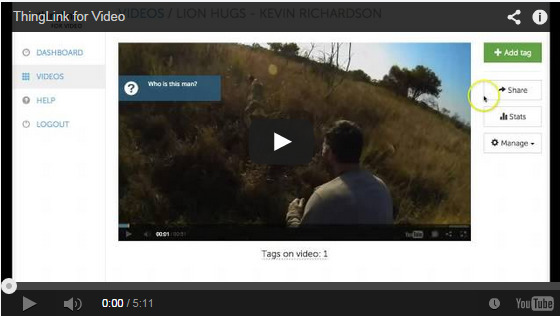
Clearly, ThingLink is becoming a popular interactive visual image editor for educators across the world. So it is truly no surprise that ThingLink for Video can be just as powerful for transforming classroom instruction and augmenting videos. See it on Scoop.it, via TIC & Educación

Continuar leyendo: 4 Ways to Transform Student Projects with ThingLink for Video

Fuente: Tic&Educación

Crea vídeos interactivos con Thinglink en menos de tres minutos

Thinglink es una herramienta que día a día se hace más popular en las redacciones. La posibilidad de dar valor a las fotos y hacerlas interactivas con variados enlaces como audios, fotos, textos o videos la han hecho cada vez más necesarias para diversas coberturas.See it on Scoop.it, via TIC & Educación

Continuar leyendo: Crea vídeos interactivos con Thinglink en menos de tres minutos

Fuente: Tic&Educación

Thinglink a Good Tool to Annotate and Create Interactive Videos for Your Class

ThingLink is one of my favourite web tools for creating interactive images.If you have never used ThingLink before then here is a step by step guide I posted earlier to outlining the entire procedure to create your first interactive visual that can embed videos, maps, text and links.See it on Scoop.it, via TIC & Educación

Continuar leyendo: Thinglink a Good Tool to Annotate and Create Interactive Videos for Your Class

Fuente: Tic&Educación

3 Ways to Use ThingLink for Video in the Classroom

Recently ThingLink introduced ThingLink for Video, an exciting new editor for annotating video content with rich media. The new editor allows users to add notes and links to existing video content, and turn video into an interactive digital discovery platform.See it on Scoop.it, via TIC & Educación

Continuar leyendo: 3 Ways to Use ThingLink for Video in the Classroom

Fuente: Tic&Educación