Artículos con la etiqueta ‘students’

3 Great Resources for Free Historical Art Works to Use in Class

The platforms below, curated from Open Culture, provides a wealth of free historical art works spanning different countries and eras. You can browse through the collections and see what you can get to use with your students in class.See it on Scoop.it, via TIC & Educación

Continuar leyendo: 3 Great Resources for Free Historical Art Works to Use in Class

Fuente: Tic&Educación

4 Important Apps for A Paperless Classroom

Planning a paperless classroom? Here are four important apps you should definitely consider. Using these apps will enable you to create and distribute assignments to your students, provide feedback on your students work, organize your classroom materials, conduct quick formative assessments via quizzes, polls or exit tickets, track grades, record attendance, create seating charts and many more.See it on Scoop.it, via TIC & Educación

Continuar leyendo: 4 Important Apps for A Paperless Classroom

Fuente: Tic&Educación

3 Powerful Apps for Creating Green Screen Videos with Students

Green screen is a cinematographic technique that allows video editors to add a variety of visual effects to their videos. These effects include : adding virtual backgrounds, superimposing subjects over animated backdrops, placing a subject on another shot and many more. Green screen technology has been widely used in weather and movie industry. But now with the emergence of apps such as the ones below, everyone can use this technology to create engaging clips and presentations. Gumersindo Fernández’s …

Continuar leyendo: 3 Powerful Apps for Creating Green Screen Videos with Students

Fuente: Tic&Educación

MinecraftEdu Takes Hold in Schools

With myriad adaptations for use in the classroom, MinecraftEdu brings Common Core–enhanced gaming to students.See it on Scoop.it, via TIC & Educación

Continuar leyendo: MinecraftEdu Takes Hold in Schools

Fuente: Tic&Educación

Google Forms: Create a Formative Assessment Quiz

An excellent tool for formative assessment is Google Forms. Good formative assessment allows you to be quickly responsive to student needs. Google Forms gives you the data from students instantly after they press submit. Since all student answers are together in one spreadsheet it is easy to quickly get a snapshot of how the students are understanding.See it on Scoop.it, via TIC & Educación

Continuar leyendo: Google Forms: Create a Formative Assessment Quiz

Fuente: Tic&Educación

Turning Your Edublog Into a Book

You may have seen other teachers produce printed portfolios or books documenting their students’ work, and you may have wondered if you could create one as well. The answer is yes you can!Whether you want to create a simple PDF version of your blog, or you want to turn it into a glossy, breathtaking, piece of art there are tools out there that you can use.See it on Scoop.it, via TIC & Educación

Continuar leyendo: Turning Your Edublog Into a Book

Fuente: Tic&Educación

3 Handy Google Drive Tools for Math Teachers

Today while we were browsing Google Docs Add-ons we selected these three tools specifically for math teachers and students. The apps will enable you to solve mathematical equations, create graphs, work on complex calculations, perform basic math/stat operations of cell values in a Google Docs table and many more.See it on Scoop.it, via TIC & Educación

Continuar leyendo: 3 Handy Google Drive Tools for Math Teachers

Fuente: Tic&Educación

Student Created Videos: Google Slides and Screencasting

Right place at the right time. The place was Edcamp Palm Springs. The time was a session on video in the classroom led by Jessica Pack. This perfect moment pushed me to provide opportunities for students to use video in their projects.See it on Scoop.it, via TIC & Educación

Continuar leyendo: Student Created Videos: Google Slides and Screencasting

Fuente: Tic&Educación

Three Video Tutorials on Using Padlet in Your Classroom

As I mentioned in my mailbag post yesterday, Padlet is one of my favorite tools for gathering comments and questions from students. I’ve also used Padlet as a task management tool, as a blogging tool, as a multimedia collage platform, and as a tool for collaborative bookmarking of websites. In the playlist embedded below I explain and demonstrate how to do all of those things with Padlet.See it on Scoop.it, via TIC & Educación

Continuar leyendo: Three Video Tutorials on Using Padlet in Your Classroom

Fuente: Tic&Educación

Why Teachers and Students Should Blog

Blogs are surprisingly easy to use. They require minimum technical knowledge and are quickly and easily created and maintained.See it on Scoop.it, via TIC & Educación

Continuar leyendo: Why Teachers and Students Should Blog

Fuente: Tic&Educación
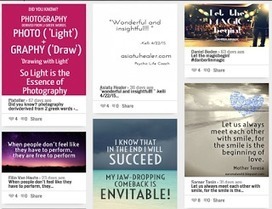
3 Simple Tools to Create Quote Posters for Your Class

Below are three of our favourite web tools for creating picture quotes. You can use these tools with your students to create beautiful quote posters for your class. These picture quotes can be used as warm-up activities or entry events to project based learning. They could also serve as prompts to brainstorm ideas around a given topic or as educational posters to embellish your classroom walls with nuggets of wisdom.See it on Scoop.

Continuar leyendo: 3 Simple Tools to Create Quote Posters for Your Class

Fuente: Tic&Educación

9 Ideas for Using ClassDojo

In my previous post I mentioned my new-found appreciation for ClassDojo. More importantly I have a new appreciation of why kids like it so much. If you haven’t tried ClassDojo before or you have looked at it and thought, “my students won’t go for that” take a look at the following nine videos featuring the various ways that you can use ClassDojo.See it on Scoop.it, via TIC & Educación

Continuar leyendo: 9 Ideas for Using ClassDojo

Fuente: Tic&Educación

Teachers’ Guide to The Use of Google Voice in Education

Google Voice is a great communicational utility with huge educational potential. As a teacher, you can use Google Voice to obtain a phone number to use when communicating with students and parents without you revealing your personal phone number. You can connect your Google Voice number with multiple phone numbers (e.g landline number, mobile number, work number) and have incoming calls routed to all of these numbers simultaneously. You can also select a single number to…

Continuar leyendo: Teachers’ Guide to The Use of Google Voice in Education

Fuente: Tic&Educación

Create a Physical Record of Your Blog With BlogBooker

The end of the school year is near for many of us. If your students have been blogging all year, you might want to have a physical copy of what they’ve written this year. Creating a physical copy of a classroom blog is a great way to show students just how much they wrote in the course of the school year. It’s one thing to tell them they wrote 10,000 words it’s another to show them how many …

Continuar leyendo: Create a Physical Record of Your Blog With BlogBooker

Fuente: Tic&Educación

Creating Badges with Google Sheets

Thinking about adding badges to your class? There are many ways to award students badges including using Class Badges. If you would like to organize your own badges here is a system you may want to try that uses Google Sheets.See it on Scoop.it, via TIC & Educación

Continuar leyendo: Creating Badges with Google Sheets

Fuente: Tic&Educación

10 Things to Start with in Google Classroom

In a nut shell, Google Classroom is Google Drive Management. It allows you to assign assignments and collect work from students. If you are just starting off with Google Classroom here are some things you will want to try first:See it on Scoop.it, via TIC & Educación

Continuar leyendo: 10 Things to Start with in Google Classroom

Fuente: Tic&Educación

Three Good Tools for Building Animated Videos in a BYOD Environment

One of the challenges that teachers face in BYOD environments is finding tools that will work for all of their students and all of the various devices they bring to school. I was reminded of this today when I received an email from a reader who was looking for a tool similar to Tellagami for her students that didn’t have iOS or Android devices.Gumersindo Fernández’s insight:Tellagami WideoScratchSee it on Scoop.it, via TIC & Educación

Continuar leyendo: Three Good Tools for Building Animated Videos in a BYOD Environment

Fuente: Tic&Educación
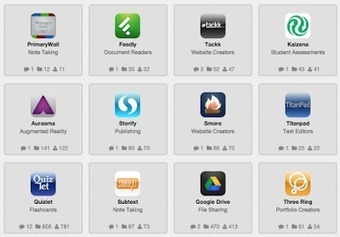
Teacher-tested Tools for Enhancing Collaboration in Class

Nothing beats a good face-to-face conversation. But when that isn’t possible, sometimes technology can help. Here are some teacher-tested tools to aid in collaborating with students and colleagues.See it on Scoop.it, via TIC & Educación

Continuar leyendo: Teacher-tested Tools for Enhancing Collaboration in Class

Fuente: Tic&Educación

How to Privately Share Videos Through YouTube

As the end of the school year approaches there are lots of occasions to shoot videos of things like commencement ceremonies, school plays, and field days. While many students and parents would like to see those videos shared, not all students and parents want to see those videos shared with the whole world. I’ve previously written about privately sharing videos through Google Drive. Another option is to privately share videos through YouTube. In the video embedded below…

Continuar leyendo: How to Privately Share Videos Through YouTube

Fuente: Tic&Educación

Building a Free Library of Interactive Resources

The founder of ThingLink, Ulla Engeström, has a goal to build a free library of interactive resources for all teachers, students and parents. She has launched a crowdfunding campaign, Women Who Tech, to gain support for education and women tech entrepreneurs. #WomenWhoTechSee it on Scoop.it, via TIC & Educación

Continuar leyendo: Building a Free Library of Interactive Resources

Fuente: Tic&Educación