
Robo Wunderkind: robótica y programación desde los 5 años
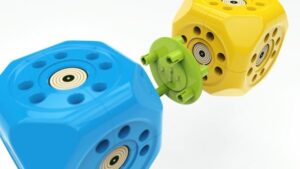 1.169 patrocinadores contribuyeron 246.612 dólares para ayudar a dar vida a este proyecto en Kickstarter. ¿Su peculiaridad? Es un kit de robótica que permite crear un robot y aprender nociones básicas de programación desde los cinco años. Se llama Robo Wunderkind, y es esencialmente un conjunto de bloques que pueden utilizarse para construir cualquier tipo de robot conectándolos unos a otros. Es una tarea muy sencilla y se basa en un enlace físico, no por sistemas de cable o …
Continuar leyendo: Robo Wunderkind: robótica y programación desde los 5 años
Fuente: Educaciontrespuntocero.com
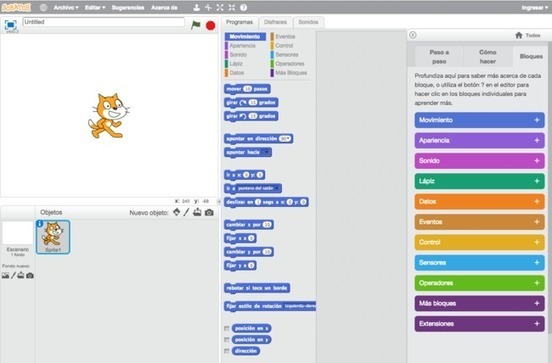 Descubre este lenguaje de programación que nació de la mano del MIT, gracias a estas herramientasSee it on Scoop.it, via Recull diari
 From the same people that brought us Photos for Class and StoryBoard That comes another great tool called Quick Rubric. Quick Rubric is a free tool for writing, editing, and printing rubrics. On Quick Rubric you can create a rubric that is tailored to your points/ scoring system, the quantity of descriptors that you need, and utilizes the exact language that you specify. You can save as many rubrics as you like in your free Quick Rubric account. …
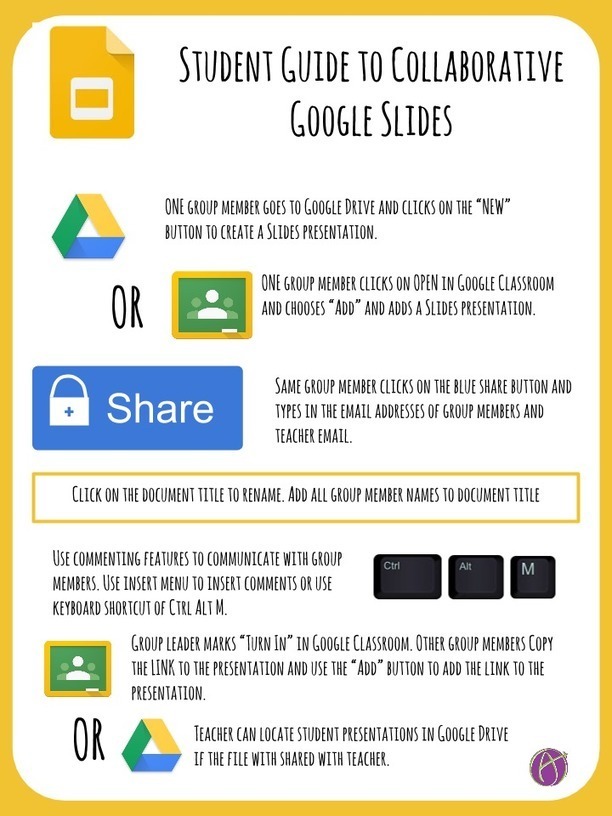 An easy way to have students start collaborating is to use Google Slides. Do not feel you need to create templates for students for every assignment, students can and should start from scratch and know how to share.See it on Scoop.it, via TIC & Educación
 Google Forms is a powerful tool with huge educational potential for teachers and educators. Besides being free and easy to use, Forms works across different devices and is seamlessly integrated with other Drive services such as Docs and Spreadsheets. As a teacher, you can use Forms for a variety of purposes including: planning an event, making surveys and polls, creating quizzes, collecting feedback and other information from students and many more. We have already posted a step…
 See it on Scoop.it, via Recull diari
 One of the challenges that teachers face in BYOD environments is finding tools that will work for all of their students and all of the various devices they bring to school. I was reminded of this today when I received an email from a reader who was looking for a tool similar to Tellagami for her students that didn’t have iOS or Android devices.Gumersindo Fernández’s insight:Tellagami WideoScratchSee it on Scoop.it, via TIC & Educación
 <!– Place this tag in your head or just before your close body tag. –> <!– Place this tag where you want the widget to render. –>
  Proyectos docentes basados en Scratch del curso del INTEF “de espectador a programador – grupo E”See it on Scoop.it, via Recull diari
 Templates have a bad reputation. Seriously. We associate them with lack of skills to make something from scratch. We link them to our unwillingness to stand out from the herd. We accuse them of being – “generic”.See it on Scoop.it, via Recull diari
 Niños de primaria aprender a hacer sus propios videojuegos. Cuatro profesores han puesto en marcha un programa educativo en distintos centros de Andalucía con herramientas informáticas. Gracias al programa Scratch, que se puede instalar y redistribuir gratuitamente en cualquier ordenador, consiguen adaptar las matemáticas y el álgebra a un lenguaje más sencillo para los alumnos de 6º de primaria. Estos profesores además han creado un portal en internet donde intercambiar sus experiencias docentes …
 There are a multitude of tools which WE could use to foster the creativity of the learners, such as “Story Telling“, coding with Scratch and other programs, comics, and interactive images with links and videos such as “ThingLink“, which I will present here with some practical examples. Below my curation about ThingLink where YOU can first read about it for a better understanding:See it on Scoop.it, via TIC & Educación
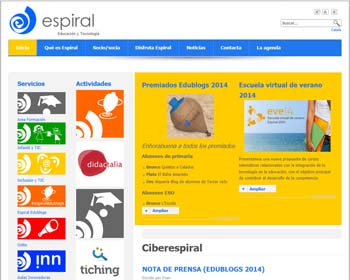 Su objetivo es poner al alcance de los docentes actividades formativas relacionadas con la integración de las tecnologías en la educación. Es la Escuela virtual de verano de la Asociación Espiral, Educación y Tecnología, y sus cursos se dirigen a profesores de todos los niveles educativos y que posean distintos grados de competencia digital. De hecho, algunos se destinan a los que se inician en el mundo 2.0, mientras que otros son para quienes ya tienen competencias avanzadas y quieren estar…
 Tuenti convoca el concurso de programación ‘Tuenti Challenge’. Propuesta TIC educativa con Tynker, Scratch, Sploder! y Code Combat para la clase de Tecnología.See it on Scoop.it, via Educacion, ecologia y TIC
 Portal web del Centro Nacional de Desarrollo Curricular en Sistemas no Propietarios,CEDEC. Centro perteneciente al Ministerio de Educación, Cultura y Deporte. Gobierno de España.See it on Scoop.it, via Educacion, ecologia y TIC
 Tynker ha lanzado un app para iPAD para enseñar a los niños a programar mediante una serie de juegos basados en el lenguaje de codificación Scratch del MIT.See it on Scoop.it, via Educacion, ecologia y TIC
 See it on Scoop.it, via Aprender y educar
 If you’ve scratched your head over suggestions to manage your “digital footprint,” you aren’t the only one.A surprisingly large percentage of people have never even heard the phrase, let alone thought about how to manage theirs responsibly. Among students, the percentage is probably higher. We’ll talk about ways you can help students understand and manage their digital footprints before they get themselves in trouble.See it on Scoop.it,
  One of the lesser-known features of Google Driveis the collaborative aspect of Drawings. Drawings in Google Drive allows you to collaboratively create drawings from scratch and or alter images that you upload to Drawings. By uploading an image you can draw on it and write on it to add labels. Google Drive Drawings supports commenting just like Google Documents. The sharing options in Drawings are the same as those of Documents too.See it on Scoop.it, via TIC …