Artículos con la etiqueta ‘zing’

17 Fantastic Infographic Generators!
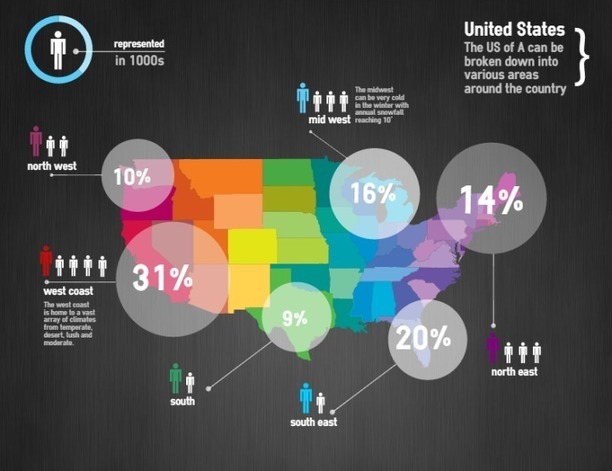
Data is crucial. However, displaying a chunk of plain data can be monotonous. Infographics visualize plain data and make it visually more appealing. Data turned into infographic has a higher potential to go viral and be effective. While many of us are designers who can design amazing infographs, Infographic Generators can come in handy to Designers and non-designers alike. They can be a time saving resource. So here is a list of 17 fantastic Infographic Generators …

Continuar leyendo: 17 Fantastic Infographic Generators!

Fuente: Tic&Educación

Teaching with Content Curation

Content curation is the process of collecting, organizing and displaying information relevant to a particular topic. Teacher content curation can be used by students and students can be asked to sh…See it on Scoop.it, via TIC & Educación

Continuar leyendo: Teaching with Content Curation

Fuente: Tic&Educación

How to Use Your Own Images in Google Forms Headers

In yesterday’s post about customizing Google Sheets headers I mentioned that you can also customize Google Forms headers. Someone emailed me this morning asking for further clarification about customizing Forms headers. In the video embedded below I demonstrate how to use your own images in Google Forms headers.See it on Scoop.it, via TIC & Educación

Continuar leyendo: How to Use Your Own Images in Google Forms Headers

Fuente: Tic&Educación

Quickly Resize Photos in Batch With Quick Image Resizer

Quick Image Resizer is a batch photo resizing tool for easily converting your multiple photos to a custom size using nothing more than drag and drop. This might be handy for people looking to upload images to websites, such as blogs, where a specific width size is required for uploaded images to appear in sync with the blog’s theme. Likewise, the compression utility within this application can be used to reduce the size of your images.See …

Continuar leyendo: Quickly Resize Photos in Batch With Quick Image Resizer

Fuente: Tic&Educación

WizIQ Recordor: Create, Share Powerful Video Lectures for Flipped Classroom

We have launched WizIQ Recordor: an amazing lecture-recording software designed exclusively for your teaching needs. This software lets you convert your PowerPoint presentations into synchronized video lectures, publish them to WizIQ (add them to Content Library), and share them with your students right from your desktop- something which no other software has enabled you to do until now. And yes, it’s absolutely free!WizIQ Recordor (yes, it’s spelt with an “OR” not “ER”. No pun…

Continuar leyendo: WizIQ Recordor: Create, Share Powerful Video Lectures for Flipped Classroom

Fuente: Tic&Educación

6 Technologies That Will Revolutionize the Classroom

From the computer to the iPad, technology is revolutionizing how we work, play, socialize, and learn (sometimes all at once). In celebration of Computer Science Education Week, we’re running the excellent infographic below, which explores 6 landmark technologies, includingEye Tracking TechnologyVirtual Reality TechnologyImmersive TechnologyWireless TechnologyWearable Computing TechnologyVideo Chat TechnologySee it on Scoop.it, via TIC & Educación

Continuar leyendo: 6 Technologies That Will Revolutionize the Classroom

Fuente: Tic&Educación

23 Seldom-Used Ideas for How to Use Twitter Lists

If you’ve read any lists on Twitter tips, whether for beginners or for experts, you’ve likely come across the common advice to use Twitter lists.Twitter lists are useful, helpful, and effective for managing and optimizing your Twitter experience.See it on Scoop.it, via TIC & Educación

Continuar leyendo: 23 Seldom-Used Ideas for How to Use Twitter Lists

Fuente: Tic&Educación

PixTeller – Poster Maker!

Create targeted image quotes, personalized greeting cards, beautiful posters or any amazing image you wish on PixTeller.com.See it on Scoop.it, via TIC & Educación

Continuar leyendo: PixTeller – Poster Maker!

Fuente: Tic&Educación

Build a ThingLink Classroom: Tips & Tricks

ThingLink EDU is packed full of features to help teachers efficiently manage a safe and secure online learning environment powered by ThingLink interactive images. Google Docs is an extremely efficient tool for organizing and managing your workflow in ThingLink in the classroom. See it on Scoop.it, via TIC & Educación

Continuar leyendo: Build a ThingLink Classroom: Tips & Tricks

Fuente: Tic&Educación

How to Enable Text Notifications for Your Google Calendar Events

Google Calendar is a fantastic tool for organizing your schedule and distributing event information to students, parents, and colleagues. Text message alerts is one of the features of Google Calendar that can help you keep track of appointments throughout the school year.See it on Scoop.it, via TIC & Educación

Continuar leyendo: How to Enable Text Notifications for Your Google Calendar Events

Fuente: Tic&Educación

Science Experiments for Kids – The Imagination Tree

Here is a collection of 30 amazing science experiments for kids of all ages to enjoy at home or school!See it on Scoop.it, via Recull diari

Continuar leyendo: Science Experiments for Kids – The Imagination Tree

Fuente: Recull Diari

11 Amazing Evernote Features Every Teacher Should Know about

Evernote is a powerful note taking web tool and mobile app. It is definitely an elemental component of teachers workflow. I have been using it for a few years now and I just can’t live without it now.Evernote enables you to take notes in both text and audio format. Your notes can also include images,videos and even files. Evernote is available across different devices so that everything you do with Evernote on your computer can be automatically …

Continuar leyendo: 11 Amazing Evernote Features Every Teacher Should Know about

Fuente: Tic&Educación

Transforming Teaching & Learning with ThingLink

The experience of bringing together a group of teachers through a common learning goal this summer has been amazing. Now nearing the end of the ThingLink Teacher Challenge Week 7, participants are creating interactive images and self-publishing them all over the world wide web. See it on Scoop.it, via TIC & Educación

Continuar leyendo: Transforming Teaching & Learning with ThingLink

Fuente: Tic&Educación

A Must Have Resource for Finding Educational Sites, Apps and Services

Graphite is one of the amazing platforms that connects teachers with technology. Graphite is a free website from Common Sense Media that provides reviews of the latest exciting innovations in educational technology, everything from video games that help students learn algebra to lectures they can watch online.See it on Scoop.it, via TIC & Educación

Continuar leyendo: A Must Have Resource for Finding Educational Sites, Apps and Services

Fuente: Tic&Educación

The Ultimate Directory Of Free Image Sources

So, you need an image for your blog? We’ve spent some time categorizing our favorite sources for free images and organizing them in such a way as to help you find what you’re looking for. Here are …See it on Scoop.it, via TIC & Educación

Continuar leyendo: The Ultimate Directory Of Free Image Sources

Fuente: Tic&Educación
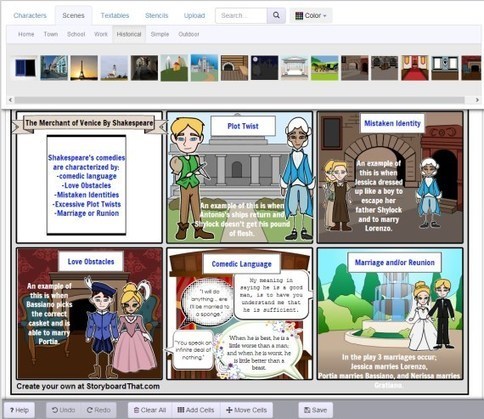
Storyboard That: The World’s Best FREE Online Storyboard Creator

Looking for an amazing, fun, free, and easy to use online storyboard creator? See why students, screenwriters, and businesses love Storyboard That.See it on Scoop.it, via TIC & Educación

Continuar leyendo: Storyboard That: The World’s Best FREE Online Storyboard Creator

Fuente: Tic&Educación

Useful Tips on Using Evernote to Improve Visual Thinking

Evernote is a great tool for capturing and organizing your notes. Evernote supports all types of notes including, text, image, video and audio notes. To better tap into the full potential of Evernote, you need to use the Evernote Web clipper. This is an extension that , once installed on your browser, will allow you to bookmark and save anything you come across online to your Evernote notebook. From within this notebook, you can then organize your notes using tags …

Continuar leyendo: Useful Tips on Using Evernote to Improve Visual Thinking

Fuente: Tic&Educación

Tips You Need To Know When Sharing Google Drive Docs with Students

The sharing functionally that Google Drive offers to its users is really an amazing feature.It is ideal for sharing files and documents with students. What is even better is the fact that you can control who sees and edits your files with visibility options and access levels. In today’s post, I am going to show you how to use these two features to share documents, files, and folders with your students.See it on Scoop.it, via…

Continuar leyendo: Tips You Need To Know When Sharing Google Drive Docs with Students

Fuente: Tic&Educación

Teacher’s Visual Guide on Giving Audio Feedback to Students on Google Drive

One of the best tools teachers can use to give both audio and textual feedback on students Google documents is called Kaizena. I have featured this tool in several posts in the past and today I am sharing with you this simple step by step guide to show you how you can actually use kaizena to provide feedback on students documents that have been created through Google Docs. I am also featuring three important updates Kaizena has added …

Continuar leyendo: Teacher’s Visual Guide on Giving Audio Feedback to Students on Google Drive

Fuente: Tic&Educación

Vuelve el increíble Spiderman

Los superhéroes han sido protagonistas de innumerables videojuegos de muy diferente calidad. En la cima de todo encontramos las aventuras protagonizadas por Batman, dentro de la serie Arkham, pero también encontramos otras propuestas interesantes, como algunas protagonizadas por el propio Spidey o por las versiones Lego de algunos de ellos. En el caso del hombre-araña, hemos podido disfrutar de grandes títulos, como Shattered Dimensions o el anterior The Amazing Spiderman, pero también de otras entregas…

Continuar leyendo: Vuelve el increíble Spiderman

Fuente: Taconline.net