Artículos con la etiqueta ‘tea’

The Teacher’s Guide To Twitter

This teacher’s guide to Twitter is designed for anyone ready to use the service or already old hat. Whatever your skill level, this should help!See it on Scoop.it, via TIC & Educación

Continuar leyendo: The Teacher’s Guide To Twitter

Fuente: Tic&Educación

PracTICE: Creativity Examples With ThingLink

There are a multitude of tools which WE could use to foster the creativity of the learners, such as “Story Telling“, coding with Scratch and other programs, comics, and interactive images with links and videos such as “ThingLink“, which I will present here with some practical examples. Below my curation about ThingLink where YOU can first read about it for a better understanding:See it on Scoop.it, via TIC & Educación

Continuar leyendo: PracTICE: Creativity Examples With ThingLink

Fuente: Tic&Educación

10 películas para hablar de creatividad en clase

Una de las mejores características de la creatividad es que se puede desarrollar y trabajar de mil formas diferentes, y en este artículo queremos sugerirte una que quizá nunca te habías planteado. ¿Te animas a descubrir 10 geniales historias para acercarte a la creatividad con tus alumnos?See it on Scoop.it, via TIC & Educación

Continuar leyendo: 10 películas para hablar de creatividad en clase

Fuente: Tic&Educación
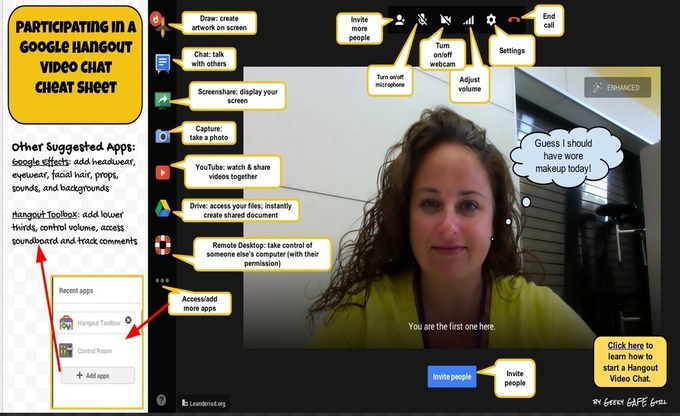
Google Hangout for Teachers- A Comprehensive Tutorial

Google Hangout is an excellent service that enables both one-on-one and group chats with up to ten people at a time.Google Hangouts are not all video based. You can hold a hangout using only the textual chat functionality or you can add voice. There is also another great feature called hangout on Air. A Hangout on the Air is a Google hangout that is broadcast both on YouTube both through your Google+ page . It’s a great …

Continuar leyendo: Google Hangout for Teachers- A Comprehensive Tutorial

Fuente: Tic&Educación

11 Amazing Evernote Features Every Teacher Should Know about

Evernote is a powerful note taking web tool and mobile app. It is definitely an elemental component of teachers workflow. I have been using it for a few years now and I just can’t live without it now.Evernote enables you to take notes in both text and audio format. Your notes can also include images,videos and even files. Evernote is available across different devices so that everything you do with Evernote on your computer can be automatically …

Continuar leyendo: 11 Amazing Evernote Features Every Teacher Should Know about

Fuente: Tic&Educación

Why Homework Matters

As an elementary/middle school teacher, I hear constant complaints about the issue of homework. There are valid points against overdoing it and even studies that suggest, in some cases, it doesn’t always help. There’s a big difference between busy work and assignments that are meaningful. Some researchers, like Sara Bennett and Nancy Kalish, propose that homework is a hidden cause of childhood obesity. Others, like Alfie Kohn, believe that the quality and quantity…

Continuar leyendo: Why Homework Matters

Fuente: Tic&Educación

10 términos educativos a replantearnos seriamente

Hay cosas que asumimos por inercia o que se disfrazan de progreso cuando representan las teorías más profundamente conservadoras que podamos encontrar en materia educativa. En TeachThought hemos encontrado 10 ejemplos para reflexionar.See it on Scoop.it, via TIC & Educación

Continuar leyendo: 10 términos educativos a replantearnos seriamente

Fuente: Tic&Educación

Great ePortfolio Resources for Teachers

With the massive uptake of web 2.0 technologies, the concept of portfolios has migrated to the cloud giving rise to what is now termed electronic portfolios or ePortfolios for short. An ePortfolio is similar in essence to the traditional pen and paper portfolio but with a set of added advantages. For instance , ePortfolios are accessible anywhere anytime with internet connection. Also ePortfolios allows for a wider inclusion of different multimedia items such as videos, podcasts, audio recordings, slides, text, images and…

Continuar leyendo: Great ePortfolio Resources for Teachers

Fuente: Tic&Educación

Kahoot- Excellent Web Tool for Creating and delivering Quizzes and Surveys to Students

Kahoot is another great student response system that teachers can use to create and deliver quizzes and surveys to students. Kahoot provides a learning environment that is ideal for engaging students for it incorporates the precepts of both game-based learning and inquiry-based learning. See it on Scoop.it, via TIC & Educación

Continuar leyendo: Kahoot- Excellent Web Tool for Creating and delivering Quizzes and Surveys to Students

Fuente: Tic&Educación

9 Characteristics of A Leading Educator

The concept of educator as a maker is further illustrated by the 9 roles Jackie thinks should be present in every teacher who is to lead a successful learning experience. These roles are :See it on Scoop.it, via TIC & Educación

Continuar leyendo: 9 Characteristics of A Leading Educator

Fuente: Tic&Educación

Transforming Teaching & Learning with ThingLink

The experience of bringing together a group of teachers through a common learning goal this summer has been amazing. Now nearing the end of the ThingLink Teacher Challenge Week 7, participants are creating interactive images and self-publishing them all over the world wide web. See it on Scoop.it, via TIC & Educación

Continuar leyendo: Transforming Teaching & Learning with ThingLink

Fuente: Tic&Educación

11 Great Apps to Enhance Your Evernote

Evernote is a powerful note taking web tool and mobile app. It is definitely an elemental component of teachers workflow. I have been using it for a few years now and I just can’t live without it now.Evernote enables you to take notes in both text and audio format. Your notes can also include images,videos and even files. Evernote is available across different devices so that everything you do with Evernote on your computer can…

Continuar leyendo: 11 Great Apps to Enhance Your Evernote

Fuente: Tic&Educación

Tap Into Sound with ThingLink & Audioboo

This weeks ThingLink Teacher Challenged asked participants to focus on audio as they design lessons. We introduced Audioboo as an integrated web based platform and app that easily captures and collects audio for use. The goal of this challenge is to use ThingLink to design a multimedia rich learning experiences to support the diverse needs of all learners.See it on Scoop.it, via TIC & Educación

Continuar leyendo: Tap Into Sound with ThingLink & Audioboo

Fuente: Tic&Educación

Handy Google Drive Tip for Teachers- Moving Docs to Multiple Folders

Here is an excellent Google Drive tip I learned today from Shake Up Learning. As much as I love Google Drive and spend so much time discovering its hidden tricks and features I must say that this new tip has completely taken me by surprise and I am not sure how I missed it.See it on Scoop.it, via TIC & Educación

Continuar leyendo: Handy Google Drive Tip for Teachers- Moving Docs to Multiple Folders

Fuente: Tic&Educación

A Must Have Resource for Finding Educational Sites, Apps and Services

Graphite is one of the amazing platforms that connects teachers with technology. Graphite is a free website from Common Sense Media that provides reviews of the latest exciting innovations in educational technology, everything from video games that help students learn algebra to lectures they can watch online.See it on Scoop.it, via TIC & Educación

Continuar leyendo: A Must Have Resource for Finding Educational Sites, Apps and Services

Fuente: Tic&Educación
Introduction to Google Classroom

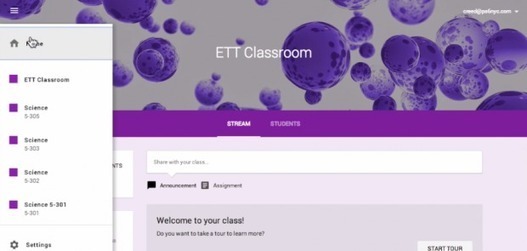
With the recent announcement of Google Classroom, school districts and educators across the country that are currently integrating Google Apps for Education into their classrooms are awaiting the opportunity to gain access to Google’s workflow solution. While there are currently a number of workflow solutions and approaches within Google Drive that classroom teachers can take that range from manual organization and file / folder sharingto advanced automation with tools such as Doctopus, See it on Scoop.it, via TIC &amp…

Continuar leyendo: Introduction to Google Classroom

Fuente: Tic&Educación

Thinglink a Good Tool to Annotate and Create Interactive Videos for Your Class

ThingLink is one of my favourite web tools for creating interactive images.If you have never used ThingLink before then here is a step by step guide I posted earlier to outlining the entire procedure to create your first interactive visual that can embed videos, maps, text and links.See it on Scoop.it, via TIC & Educación

Continuar leyendo: Thinglink a Good Tool to Annotate and Create Interactive Videos for Your Class

Fuente: Tic&Educación

5 Tips for Avoiding Teacher Burnout

Edutopia blogger Mary Beth Hertz addresses teacher burnout with suggestions for both educators and administrators. Her tips include an ongoing attitude of professional development, including all stakeholders when things change, and maintaining a personal life.See it on Scoop.it, via TIC & Educación

Continuar leyendo: 5 Tips for Avoiding Teacher Burnout

Fuente: Tic&Educación

The Teacher’s Guide To Using Badges In Your Classroom

Boy Scouts do it. Video games do it. Sometimes grades aren’t enough. What’s a teacher to do? Check out this handy guide to using badges in your classroom!See it on Scoop.it, via TIC & Educación

Continuar leyendo: The Teacher’s Guide To Using Badges In Your Classroom

Fuente: Tic&Educación

10 Things Every Teacher Should Know How To Do With Google Docs

Google Docs is a powerful word processing tool that many schools have adopted. As it’s similar to Microsoft Word and other word processing tools, most of its features are intuitive to use. However, in addition to completing many of the functions of a traditional word processor, Google Docs provides even more capabilities that can be invaluable to educators. Here are ten tricks that can make your life easier with Google Docs.See it on Scoop.it, via TIC &amp…

Continuar leyendo: 10 Things Every Teacher Should Know How To Do With Google Docs

Fuente: Tic&Educación