Artículos con la etiqueta ‘classroom’

8 excelentes herramientas web para crear video-quizzes para Flipped Classroom
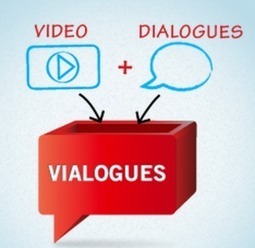
Traemos hoy una lista de OCHO recursos web que se pueden utilizar para generar interacción cuando nuestros estudiantes ven los vídeos. Mediante el uso de estas herramientas, podremos añadir características interactivas a los vídeos, crear lecciones y también diseñar determinadas actividades de diferenciación dentro del grupo. Algunas de ellas son bastante conocidas (edpuzzle, educanon), otras menos…Gumersindo Fernández’s insight:1- Vialogues2- Edpuzzle3- Google forms4- Educanon5- Videonot6- HapYak7- Blubbr8- TedEdSee it …

Continuar leyendo: 8 excelentes herramientas web para crear video-quizzes para Flipped Classroom

Fuente: Tic&Educación

Using Aurasma to Bring Static Classrooms to Life

Aurasma is one of those special tools that just blows students away, allowing you to link video, audio and 3D imagery to objects in your classroom.See it on Scoop.it, via TIC & Educación

Continuar leyendo: Using Aurasma to Bring Static Classrooms to Life

Fuente: Tic&Educación
7 Simple Ways You Can Help Students Pay Attention In A Traditional Classroom

7 Simple Ways You Can Help Students Pay Attention by TeachThought Staff For many teachers, helping students “pay attention” is probably the wrong way to help improve what you’re probably trying to improve. Listless students….See it on Scoop.it, via TIC & Educación

Continuar leyendo: 7 Simple Ways You Can Help Students Pay Attention In A Traditional Classroom

Fuente: Tic&Educación
6 sencillas herramientas para crear nuestras lecciones de vídeo en el Aula

Si nos enfrentamos a un modelo de trabajo en el aula Flipped Classroom , tenemos muchas opciones para hacer screencast y creación de vídeo, no todas se ajustan a nuestras necesidades en el aula por lo que lo primero que debemos hacer es analizarlas y ver cuál se adecua mejor a nuestros alumnos. Screencast o screencasting es una técnica que sirve para hacer grabaciones digitales en vídeo de lo que haya en la …

Continuar leyendo: 6 sencillas herramientas para crear nuestras lecciones de vídeo en el Aula

Fuente: Tic&Educación

5 Ideas for Using Padlet In School – Suggestions Welcome

Padlet is a great tool that I frequently use in my workshops. One of the reasons that I like it so much is that it is easy to use. I also like it because it can be used for a bunch of purposes. Here are five ways that I like to use it. At the bottom of this post I have included a Padlet wall that I encourage you to use to add your ideas about using Padlet …

Continuar leyendo: 5 Ideas for Using Padlet In School – Suggestions Welcome

Fuente: Tic&Educación

Comics in the Classroom – Webinar Recording

Last night Storyboard That sponsored a webinar on using comics in the classroom. The webinar reached capacity quickly and unfortunately some people who wanted to join the live session could not get in. The recording of last night’s webinar is now available to view online. I have embedded the recording below (if you’re reading this in RSS or email, you may have to click here to see the video).See it on Scoop.it, via TIC &amp

Continuar leyendo: Comics in the Classroom – Webinar Recording

Fuente: Tic&Educación

11 Simple Ways To Start Using Technology In Your Classroom

If you’re on the education technology fence, you probably can’t decide which device or app is the best one to really use. You aren’t sure if you want to jump into the edtech pool with Evernote, Moodle, an iPad, a Chromebook, or some other hot new product or service. That’s because there are an overwhelmingly …See it on Scoop.it, via TIC & Educación

Continuar leyendo: 11 Simple Ways To Start Using Technology In Your Classroom

Fuente: Tic&Educación

[EpEcT] The Flipped Classroom – PLSQL

Flipped Classroom se podría traducir como “la clase al revés” y en este artículo se aborda cómo motivar a los alumnos con esta metodología. Trabajando de esta forma, lo que antes era una tarea práctica que se hacía en casa, ahora se hace en el aula. Por otro lado, las clases teóricas se trasladan fuera de clase, gracias a la utilización de videotutoriales sobre los contenidos propios de la asignatura. Se trata de un modelo híbrido entre …

Continuar leyendo: [EpEcT] The Flipped Classroom – PLSQL

Fuente: Educacontic.es

How to Use Weebly to Create a Website

Whenever I am asked for recommendation for a first step on the road to technology integration, I suggest creating a classroom blog or website. You can accomplish a lot of things by creating and maintaining a classroom website. You can use it to keep parents updated about what is happening in your classroom, share hand-outs, and use it as a place to showcase your students’ best work. One of the services that I like to…

Continuar leyendo: How to Use Weebly to Create a Website

Fuente: Tic&Educación

Classroom en píldoras

Gumersindo Fernández’s insight:Lista de reproducción de Raúl Luna.See it on Scoop.it, via TIC & Educación

Continuar leyendo: Classroom en píldoras

Fuente: Tic&Educación
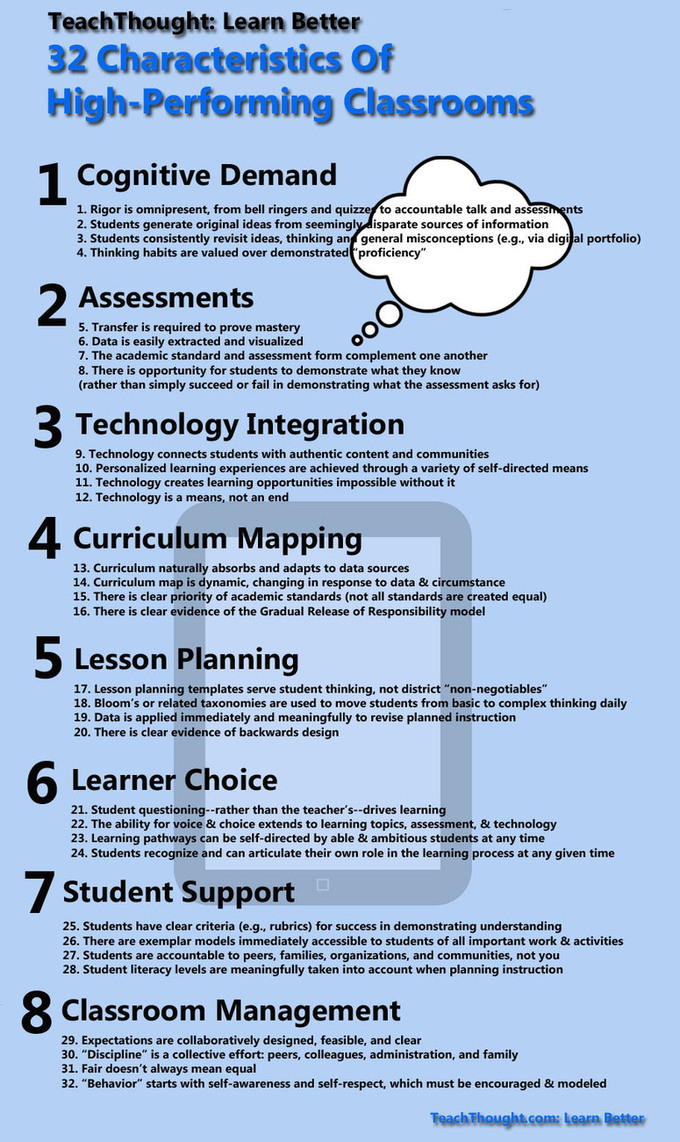
Taking Classroom Tech Use to the Next Level: Specific Traits to Look For

Dissatisfied with existing frameworks used to judge the effectiveness of classroom tech a group of instructional coaches are trying to build their own tool with help from other educators.See it on Scoop.it, via Recull diari

Continuar leyendo: Taking Classroom Tech Use to the Next Level: Specific Traits to Look For

Fuente: Recull Diari

A Tutorial For Google Drive In The Classroom

A Tutorial For Google Drive In The ClassroomSee it on Scoop.it, via TIC & Educación

Continuar leyendo: A Tutorial For Google Drive In The Classroom

Fuente: Tic&Educación
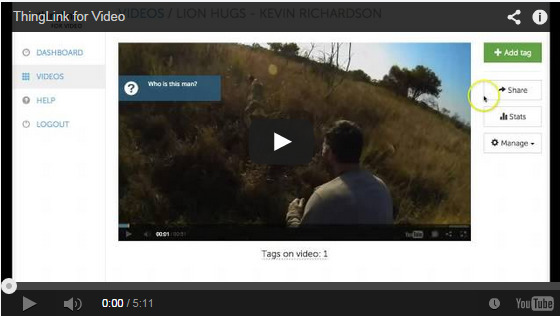
4 Ways to Transform Student Projects with ThingLink for Video

Clearly, ThingLink is becoming a popular interactive visual image editor for educators across the world. So it is truly no surprise that ThingLink for Video can be just as powerful for transforming classroom instruction and augmenting videos. See it on Scoop.it, via TIC & Educación

Continuar leyendo: 4 Ways to Transform Student Projects with ThingLink for Video

Fuente: Tic&Educación

20 Things You Can Do With Google Classroom

Google Classroom (http://classroom.google.com) is available to schools with a Google Apps for Education (GAfE)domain. Classroom is a way to get all of your students in one place and allows you to easily assign work and for students to turn it in.See it on Scoop.it, via TIC & Educación

Continuar leyendo: 20 Things You Can Do With Google Classroom

Fuente: Tic&Educación
Sencillos tutoriales para crear nuestras propias videolecciones curriculares en el aula

En Inevery Crea nos preparamos para el próximo curso escolar 2014-2015 y en la manera de introducir nuevas dinámicas de aprendizaje, herramientas 2.0. metodologías … Si hablamos de trabajar en nuestras aulas nuevas metologías, Flipped Classroom es una buena opción. See it on Scoop.it, via TIC & Educación

Continuar leyendo: Sencillos tutoriales para crear nuestras propias videolecciones curriculares en el aula

Fuente: Tic&Educación

Build a ThingLink Classroom: Tips & Tricks

ThingLink EDU is packed full of features to help teachers efficiently manage a safe and secure online learning environment powered by ThingLink interactive images. Google Docs is an extremely efficient tool for organizing and managing your workflow in ThingLink in the classroom. See it on Scoop.it, via TIC & Educación

Continuar leyendo: Build a ThingLink Classroom: Tips & Tricks

Fuente: Tic&Educación