Artículos con la etiqueta ‘power’

20 Top Pinterest Tips

Pinterest is different from other sites. When you pin something, people will be looking at and repinning it years later. Pinterest may be the secret powerhouse of educational sharing. Here are 20 power tips that you can use in many areas of schools and your classroom.See it on Scoop.it, via TIC & Educación

Continuar leyendo: 20 Top Pinterest Tips

Fuente: Tic&Educación

Cómo crear archivos de Microsoft Office (Word, Excel y PowerPoint) con Google Docs, Sheets y Slides

Desde mediados del año pasado las aplicaciones para Android de la suite ofimática de Google son compatibles con los archivos de Microsoft…See it on Scoop.it, via Recull diari

Continuar leyendo: Cómo crear archivos de Microsoft Office (Word, Excel y PowerPoint) con Google Docs, Sheets y Slides

Fuente: Recull Diari

Create free presentations without PowerPoint

Can’t afford Microsoft’s venerated program? Or maybe you want to build slide decks that really stand out? Try one of these PowerPoint killers.See it on Scoop.it, via TIC & Educación

Continuar leyendo: Create free presentations without PowerPoint

Fuente: Tic&Educación

Use Twitter to Create a Global Classroom

Don’t let @justinbieber ruin it for you. With 59.8 million Twitter followers as of this writing, the hype around J-Biebs is exactly what drives thoughtful people to run in the opposite direction of a powerful tool for learning and connecting. While some teachers have told me, “I’d never waste my time on Twitter” others I’ve worked with have declared “Twitter is the most powerful professional development tool I’ve ever used!”See it on Scoop.it, via TIC

Continuar leyendo: Use Twitter to Create a Global Classroom

Fuente: Tic&Educación
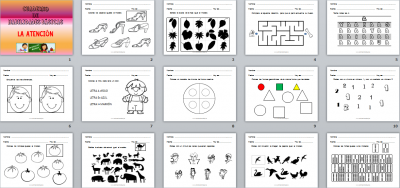
Cuaderno de habilidades básicas para trabajar la atención Editable al estilo de Orientación Andújar

Dentro de los materiales que habitualmente compartimos con todos nuestros seguidores, nuestras fichas de Antención tienen un interés especial. Os dejamos este fantástico cuaderno de habilidades básicas para trabajar la atención. Primero de una serie de entregas de cuadernos que estamos realizando. Con este material hemos pretendido abordar  uno de los aspectos que se consideran básicos para afrontar con garantías de éxito tanto la lecto-escritura como la numeración y el cálculo básico, como es la atención. Este …

Continuar leyendo: Cuaderno de habilidades básicas para trabajar la atención Editable al estilo de Orientación Andújar

Fuente: orientacionandujar.es

This Is How to Create Flipped Videos by Adding Interactive Elements and Annotations to YouTube Clips

In an earlier post covering the best YouTube resources for teachers I argued that the educational potential of YouTube resides in it being both a free platform that provides a wide variety of educational videos to use in class and also in the powerful editing features it offers to video creators. In today’s post, I am sharing with you one of YuTube’s useful editing feature that allows you to add interactivity to your videos.See it on …

Continuar leyendo: This Is How to Create Flipped Videos by Adding Interactive Elements and Annotations to YouTube Clips

Fuente: Tic&Educación

How to Make a Cartoon of Yourself in PowerPoint – Advanced Animation Tutorial

My newest tutorial video about ways to make a cartoon of yourself in PowerPoint, including using CrazyTalk Animator, which is a separate software you can get for advanced animation. I also show you some very cool techniques that only require only PowerPoint. Play around to find your favorite method!See it on Scoop.it, via TIC & Educación

Continuar leyendo: How to Make a Cartoon of Yourself in PowerPoint – Advanced Animation Tutorial

Fuente: Tic&Educación

Some of My Favorite Resources for Introducing Google Earth & Maps Beyond Social Studies

Google Earth and Google Maps has always been a natural fit in social studies classrooms. But Google Earth and Maps can also be powerful tools in other content areas. The resources below represent some of my favorite resources for introducing Google Earth and Maps in areas outside of social studies.See it on Scoop.it, via TIC & Educación

Continuar leyendo: Some of My Favorite Resources for Introducing Google Earth & Maps Beyond Social Studies

Fuente: Tic&Educación
Power Point a vídeo

Uno de los recursos más utilizados en el modelo flipped classroom para transmitir conocimiento a los alumnos son los vídeos. Multitud de profesores invirtieron en su momento gran cantidad de tiempo diseñando presentaciones en Power Point instructivas y atractivas. Ahora, con la nueva versión de Office -2013- podemos exportar nuestras presentaciones como vídeo.See it on Scoop.it, via TIC & Educación

Continuar leyendo: Power Point a vídeo

Fuente: Tic&Educación
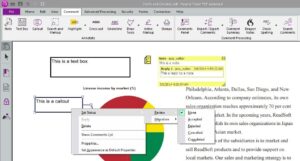
Análisis: Power PDF, un completo programa para crear y editar PDFs

Trabajar con archivos PDF no siempre es fácil y tampoco es todo lo flexible que es recomendable en un entorno como el educativo. En un escenario como éste es donde se convierten en útiles las soluciones como Power PDF de Nuance, que hemos tenido la oportunidad de probar. Basado en Office Power PDF (en su versión Advanced; hay otra Standard), es un editor y convertidor de archivos PDF con las mismas características que Acrobat Pro, aunque…

Continuar leyendo: Análisis: Power PDF, un completo programa para crear y editar PDFs

Fuente: Educaciontrespuntocero.com
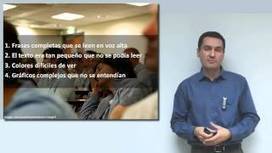
¿Cómo son las presentaciones eficaces?

Curso sobre cómo realizar presentaciones eficaces (tanto powerpoint como sin él), realizado por la Universidad de Cantabria.See it on Scoop.it, via TIC & Educación

Continuar leyendo: ¿Cómo son las presentaciones eficaces?

Fuente: Tic&Educación

¿Cómo ver presentaciones PowerPoint en Android?

En la actualidad, ya sea en el ámbito laboral como estudiantil, uno de los formatos que posee una gran aceptación para la presentación de diversos proyectos y trabajos son aquellos documentos creados en el programa PowerPoint de la suite de Microsoft Office, ya que nos permiten incluir desde video, audio, imágenes, y es una de las mejores opciones para la generación de diapositivas.See it on Scoop.it, via TIC & Educación

Continuar leyendo: ¿Cómo ver presentaciones PowerPoint en Android?

Fuente: Tic&Educación

A Beautiful Sketchnote on How Teachers Can Use Twitter for Professional Development

In a recent post I shared here a few days ago, I featured 10 effective ways teachers can leverage the power of Twitter to grow professionally. However, today as I was wading through my Pinterest feeds I stumbled upon this beautiful sketchnote from Langtwiches on the same topic I covered in the aforementioned post: Twitter for professional development. I liked this sketchnote and decided to share it with you. You can also check this Pinterest board for …

Continuar leyendo: A Beautiful Sketchnote on How Teachers Can Use Twitter for Professional Development

Fuente: Tic&Educación

The 18 Best Infographics Of 2014

2014 saw stellar examples of the power of data visualization to shed light on nearly any subject, from politics to dogs.See it on Scoop.it, via TIC & Educación

Continuar leyendo: The 18 Best Infographics Of 2014

Fuente: Tic&Educación

WizIQ Recordor: Create, Share Powerful Video Lectures for Flipped Classroom

We have launched WizIQ Recordor: an amazing lecture-recording software designed exclusively for your teaching needs. This software lets you convert your PowerPoint presentations into synchronized video lectures, publish them to WizIQ (add them to Content Library), and share them with your students right from your desktop- something which no other software has enabled you to do until now. And yes, it’s absolutely free!WizIQ Recordor (yes, it’s spelt with an “OR” not “ER”. No pun…

Continuar leyendo: WizIQ Recordor: Create, Share Powerful Video Lectures for Flipped Classroom

Fuente: Tic&Educación

A Very Good Way to Remotely Access your Computer or Chromebook

There are several tools out there that you can use to remotely access your computer. I have actually tried some of them in the past but recurring glitches were their main weaknesses. Instead, Chrome Remote Desktop provides a very powerful alternative to these tools. This is an app created by Google engineers (so no worries about security issues) which enable you to access your Mac, Windows computer, or even Chromebook from another device and right from your …

Continuar leyendo: A Very Good Way to Remotely Access your Computer or Chromebook

Fuente: Tic&Educación

A Very Useful Tool to Create Educational Animated Videos on Google Drive

PowToon is a very powerful web app which you can use on Google Drive to create beautiful animated videos and presentations. PowToon provides you with all the necessary animation tools you’ll need to immediately begin creating your own professional-looking animated explainer videos and animated presentations. It has an easy to use interface with pre-designed templates and a variety of style libraries to choose from.See it on Scoop.it, via TIC & Educación

Continuar leyendo: A Very Useful Tool to Create Educational Animated Videos on Google Drive

Fuente: Tic&Educación

The power of I’dont know

.See it on Scoop.it, via Aprender y educar

Continuar leyendo: The power of I’dont know

Fuente: Aprender y Educar
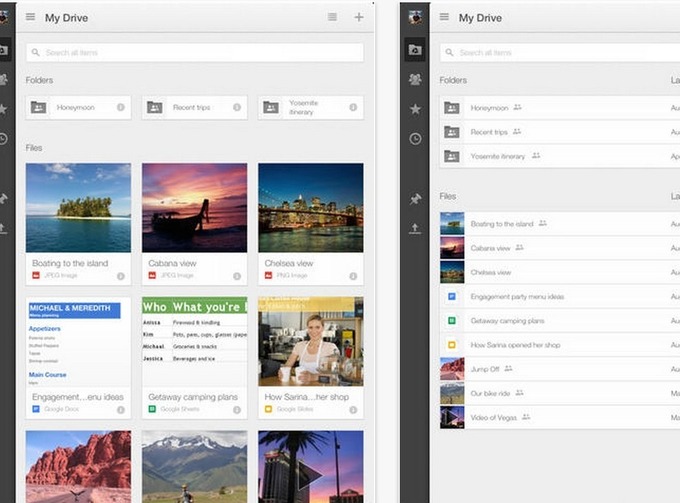
The 5 Recent Google Drive Updates Teachers Should Know About

As you might have noticed, Google has recently released some powerful updates to its Google Drive rendering it more user-friendly. I have already reviewed each of these new updates in separate posts in the past. However, today I aggregated all of these new updates in this page to make it easy for you to access and browse through them from one single place.See it on Scoop.it, via TIC & Educación

Continuar leyendo: The 5 Recent Google Drive Updates Teachers Should Know About

Fuente: Tic&Educación

A Great Tool to Create 3D Timelines in Class

Tiki-Toki is a powerful web tool that allows you to create visually appealing and interactive multimedia timelines. This app is web-based and does not require any software installation. TikiToki timelines can include a wide variety of materials such as images, text, and videos (from YouTube and Vimeo or AVIS). What’s more, TikiToki now supports 3D timelines which means that you can both create and view timelines in 3D.See it on Scoop.it, via TIC & Educación

Continuar leyendo: A Great Tool to Create 3D Timelines in Class

Fuente: Tic&Educación