Artículos con la etiqueta ‘teachers’

Two of The Best Text to Speech Tools for Teachers
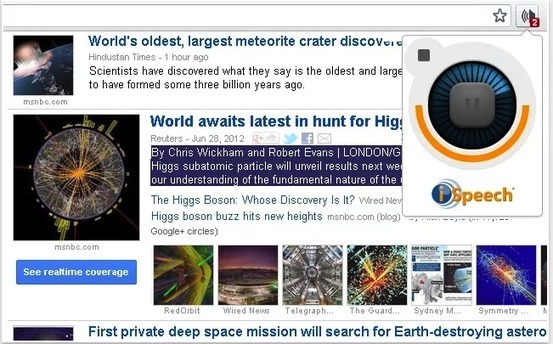
Below are two of the best text to speech apps out there. We have already reviewed these apps in previous posts and today we have them in one list for you to try and choose the one you like. These add-ons have integrated iSpeech technology which allows them to read any text you select for them. Watch the attached videos to see how each one of them works.See it on Scoop.it, via TIC

Continuar leyendo: Two of The Best Text to Speech Tools for Teachers

Fuente: Tic&Educación

Some Handy Google Maps Tutorials for Teachers

Google Maps is an excellent tool to use with students to develop their spatial thinking. Beyond getting driving or walking directions to the other, this tool enables students to discover the world right from their classrooms. It is also a very good way to teach students about geography concepts, distance measurement, map readings and other fundamentals of mapping such as longitude, latitude, locations and many more.See it on Scoop.it, via TIC & Educación

Continuar leyendo: Some Handy Google Maps Tutorials for Teachers

Fuente: Tic&Educación
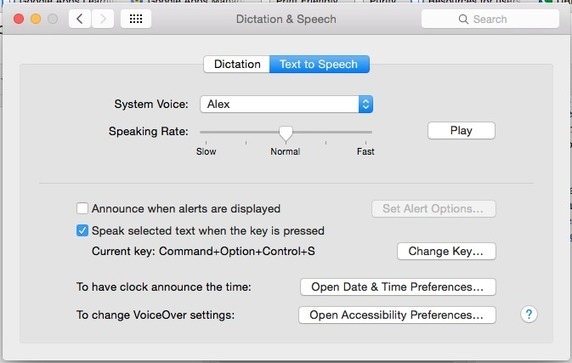
Text to Speech in Google Earth

Recently, some of our 6th graders came into the computer lab to do research using Google Earth. The teachers on the 6th grade team had spent many hours digitizing curriculum and making Google Earth Tours (.kmz files) for their students as it is a wonderful way for students to experience the world around them.See it on Scoop.it, via TIC & Educación

Continuar leyendo: Text to Speech in Google Earth

Fuente: Tic&Educación

Canva for Education – Lesson Plans Incorporating Visuals Across the Curriculum

Canva is a nice tool for designing infographics, collages, flyers, and slides in your web browser or on your iPad. I’ve been a fan of the service since it launched. In fact, I like it so much that I became an unpaid advisor to them when they started thinking about developing resources specifically for teachers.See it on Scoop.it, via TIC & Educación

Continuar leyendo: Canva for Education – Lesson Plans Incorporating Visuals Across the Curriculum

Fuente: Tic&Educación

Two Powerful Google Drive Tools for Signing Your Docs and PDFs

There are several tools out there that claim to help users add electronic signature to their documents and PDFs but only a select few are really worth the try. We have been testing some of these tools and we have also checked different user reviews and came up with the titles below. We believe these are among the best Chrome tools teachers can use to electronically sign their documents. Both of these apps are integrated with Google Drive so you …

Continuar leyendo: Two Powerful Google Drive Tools for Signing Your Docs and PDFs

Fuente: Tic&Educación

Some Very Good Chrome Tools to Annotate and Edit PDFs

PDFs (portable document formats) are probably the most popular document format we use in our daily work as teachers and educators. As such, we deemed it important that we share with you this list of some interesting tools to help you do more with your PDF files. These Chrome apps will allow you to edit, annotate, convert, view, fill forms and share PDFs. Some of these add-ons (such as the first two in this list) are …

Continuar leyendo: Some Very Good Chrome Tools to Annotate and Edit PDFs

Fuente: Tic&Educación

A Handful of Good Chrome Tips for Teachers

We are also sharing with you this list of video tutorials covering some handy tips on how to use different features on Chrome. Check them out below:See it on Scoop.it, via TIC & Educación

Continuar leyendo: A Handful of Good Chrome Tips for Teachers

Fuente: Tic&Educación
50 Of The Best Google Chrome Extensions For Teachers

As of April 2014, Google Chrome become the de facto internet browser, passing Internet Explorer for the first time after a five-year free-fall from Microsoft’s out-of-favor software. Fast forward to today, and StatCounter paints an even bleaker picture for Google Chrome competition, with Safari, Firefox, and IE combined still below Chrome’s nearly-50% market share.See it on Scoop.it, via TIC & Educación

Continuar leyendo: 50 Of The Best Google Chrome Extensions For Teachers

Fuente: Tic&Educación

5 Ways Google Tools Can Make Education More Exciting

Google’s no stranger to the education space. Teachers have been benefiting from the tools they create for years. Every time Google adds a new product or tool to their offerings, teachers get to work figuring out creative ways their students can benefit from it.See it on Scoop.it, via TIC & Educación

Continuar leyendo: 5 Ways Google Tools Can Make Education More Exciting

Fuente: Tic&Educación

101 Ways For Teachers To Be More Creative

Creativity isn’t always something that just happens. It can take quite a bit of work to nurture, grow, and develop creativity, even for those who are immersed in creative and dynamic fields.See it on Scoop.it, via TIC & Educación

Continuar leyendo: 101 Ways For Teachers To Be More Creative

Fuente: Tic&Educación

3 Important Google Drive Tips for Teachers

For those of you who haven’t seen them yet, Google for Education has recently added some interesting posts covering a bunch of handy features to use on your Google Drive. Here are the three most interesting updates I want to bring to your attentionSee it on Scoop.it, via TIC & Educación

Continuar leyendo: 3 Important Google Drive Tips for Teachers

Fuente: Tic&Educación

Connected Mind- A Good Mind mapping app for Teachers and Students

Connected Mind is a very good Chrome extension that allow users to create beautiful mind maps and store them in the cloud. Mind maps you create via this tool can include a wide variety of multimedia materials including : text, images, shapes, arrows, and you also have access to a set of multiple colours and fonts to choose from. You can create as many maps as you like and save them for free in the cloud storage provided.See it on …

Continuar leyendo: Connected Mind- A Good Mind mapping app for Teachers and Students

Fuente: Tic&Educación

Guía didáctica para optimizar iTunes U

Hace dos semanas que os presentábamos un post dedicado a la colección de guías didácticas que Apple ha creado recientemente catalogada como parte de Lesson Ideas (ideas para las lecciones). En el mismo apartado de Apple Education  existe otra guía muy interesante y que queremos dedicar esta entrada. Discovering iTunes U Collections. Tips for the Classroom es un […]

Continuar leyendo: Guía didáctica para optimizar iTunes U

Fuente: Ididactic.com
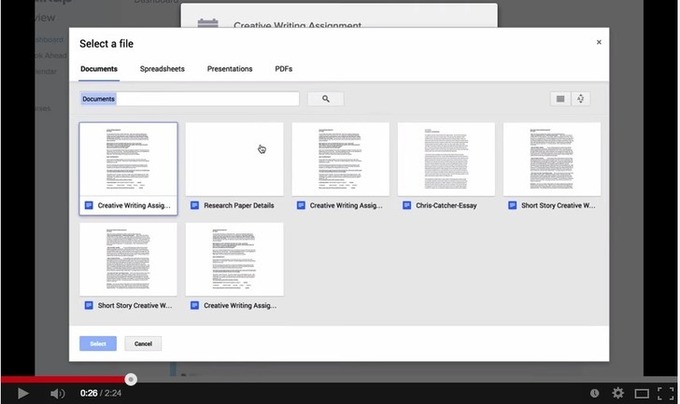
Chalkup- A Wonderful Google Drive Tool for Teachers

I just learned through an email from Justin Chando about this interesting update to Chalkup. The folks in Chalkup have finally made the move to Google Drive and created a seamless integration of Chalkup with Google Drive. Chalkup is a great web tool that allows teachers to create classes and share different study materials on a message board that students can access in real-time.See it on Scoop.it, via TIC & Educación

Continuar leyendo: Chalkup- A Wonderful Google Drive Tool for Teachers

Fuente: Tic&Educación
Excellent Educational Games for Students

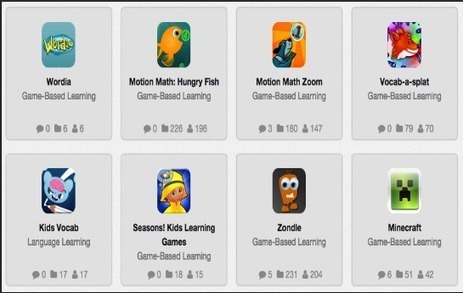
Good educational games are always a popular topic amongst teachers and parents. And students too, I’m sure. Here are some interesting learning games spanning topics like rocket science, computer programming, city building, and math.See it on Scoop.it, via TIC & Educación

Continuar leyendo: Excellent Educational Games for Students

Fuente: Tic&Educación
What teachers can and can’t do on Google Classroom

Are you still wondering what Google Classroom is all about and whether you should start using it or not? This video explanation created by Amy Mayer is a definitely a must watch. Amy provides a concise overview of the current features of Google Classroom. She started with the things you can do with Google Classroom and used some examples of how teachers are implementing it in their classrooms; how it is used for assignments, how it…

Continuar leyendo: What teachers can and can’t do on Google Classroom

Fuente: Recull Diari

How to Use Skitch to Blur Faces and More

On Monday I wrote a short post about using Skitch to protect students’ privacy when sharing pictures of school events. A few people contacted me through the FreeTech4Teachers Facebook page for more information about how Skitch works. To answer those questions I created the video that you see embedded below.See it on Scoop.it, via TIC & Educación

Continuar leyendo: How to Use Skitch to Blur Faces and More

Fuente: Tic&Educación

Two Ways to Bookmark Favorite Links from Twitter

One of the best things about Twitter is the wealth of links that teachers share with each other. It can be hard to keep track of all of the links that you might find while watching a hashtag like #edchat or #edtechchat. I tend to open a link then bookmark it with Evernote’s web clipper. My process involves opening a link in a new window then bookmarking it. It’s not the most efficient process, but it works for…

Continuar leyendo: Two Ways to Bookmark Favorite Links from Twitter

Fuente: Tic&Educación

Three Free Tools for Creating Stopmotion and Timelapse Videos

Creating stopmotion and timelapse videos can be a good way for students to tell a story that they have developed. Stopmtion and timelapse videos can also be helpful when teachers are trying to help students see how a lengthy process like osmosis works. While good stopmotion and timelapse videos can take a long time to create, there are some tools that can make the process a little easier. Here are three stopmtion video creation tools that are worth …

Continuar leyendo: Three Free Tools for Creating Stopmotion and Timelapse Videos

Fuente: Tic&Educación

Protect Student Privacy by Using Skitch

In yesterday’s post about creating digital records of physical items I mentioned using Skitch to take pictures and annotate them. One of the things about Skitch that I failed to mention in that post is that along with drawing and typing on a picture you can crop and blur items in a picture.See it on Scoop.it, via TIC & Educación

Continuar leyendo: Protect Student Privacy by Using Skitch

Fuente: Tic&Educación